
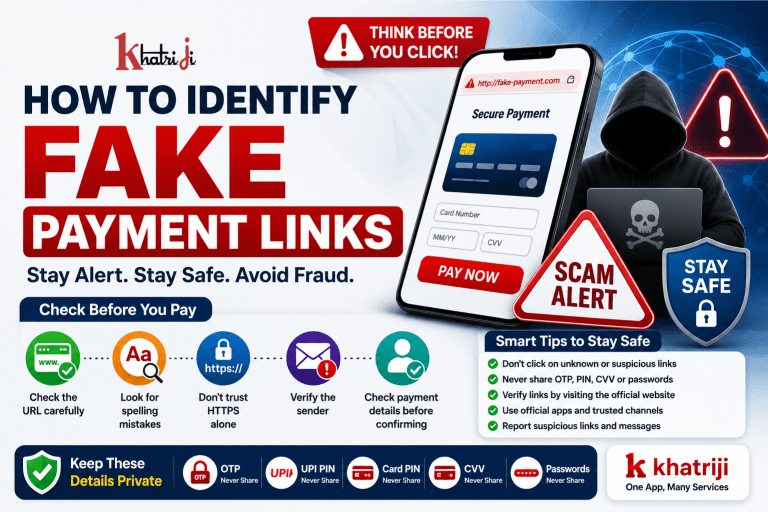
Digital payments have made it easier to pay bills, recharge mobile numbers, shop online and transfer money. However, the increasing use of digital payments has also created opportunities for fraudsters to distribute fake payment links.
A fake payment link may look like a genuine payment, refund, KYC, customer-support or bill-payment link. The goal is often to make you reveal sensitive information, approve an unwanted transaction, or install malicious software.
The good news is that you can reduce your risk by learning how to recognize suspicious links before clicking or making a payment.
In this guide, we explain how to identify fake payment links, what warning signs to look for, what you should check before making a payment, and what to do if you accidentally click a suspicious link.
What Is a Fake Payment Link?
A fake payment link is a link created or distributed by a fraudster that attempts to imitate a legitimate payment or service website.
It may be sent through:
- SMS
- Social media
- Phone calls
- Messaging applications
- Online advertisements
- Fake customer-support conversations
A message may claim that you need to:
- Pay an outstanding bill
- Complete a refund
- Update KYC
- Verify your account
- Receive cashback
- Confirm a booking
- Pay a delivery charge
- Reactivate an account
- Complete a recharge
- Pay a subscription
- Claim a reward
The link may then take you to a website designed to look similar to a genuine service.
Why Do Fraudsters Use Fake Payment Links?
Fake links are often used because they can make a fraudulent request appear legitimate.
For example, a message may say:
“Your payment is pending. Complete payment immediately to avoid cancellation.”
Another message may say:
“Your refund is ready. Click here to receive it.”
The use of urgency, familiar branding and payment-related language can make people act without checking the link.
The safest approach is to stop, verify and then pay.
10 Signs of a Fake Payment Link
Here are some of the most important warning signs.
1. The Message Creates Urgency
One of the biggest warning signs is unnecessary pressure.
Examples include:
“Pay within 10 minutes.”
“Your account will be blocked today.”
“Your service will be disconnected immediately.”
“Last chance to claim your refund.”
Fraudsters may use urgency to prevent you from checking the information carefully.
What should you do?
Don’t make a payment simply because a message says you have limited time.
Open the official website or application yourself and check whether the payment is actually due.
2. Check the Website Address Carefully
Before entering any payment information, look carefully at the website address.
Fraudsters may create addresses that resemble legitimate websites but contain additional words, spelling changes or unrelated domains.
For example, a suspicious website may use:
- Extra words
- Misspelled brand names
- Unusual subdomains
- Random numbers
- Unfamiliar domain extensions
Important
Don’t judge a website only by how its page looks.
A fake website can be designed to look very similar to a genuine website.
The website address matters.
3. Look for Misspelled Brand Names
Fraudsters may use domains or page names that are almost identical to genuine brands.
For example, a fraudulent address could contain:
- A spelling variation
- An extra character
- A missing character
- A different word
- An unusual combination of letters
Always compare the address with the official website address you already know.
If you are unsure, don’t use the link in the message.
Instead, type the official website address yourself or open the official application.
4. Don’t Trust a Link Just Because It Uses HTTPS
Many users believe:
“If the website has HTTPS, it must be safe.”
This is not a reliable rule.
HTTPS encrypts communication between your browser and the website, but it does not automatically prove that the website operator is legitimate.
A fraudulent website can also use HTTPS.
Therefore, check:
- The domain name
- The organization behind the website
- The reason you received the link
- The payment request
- The recipient details
Don’t treat the padlock or HTTPS alone as proof that a payment website is genuine.
5. Be Careful With Shortened URLs
Shortened links can hide the actual destination.
Examples include links that use URL-shortening services or shortened-looking addresses.
A message may say:
“Click here to complete your payment.”
But you may not immediately know where the link will take you.
Safer approach
If you weren’t expecting the link, don’t click it.
Instead:
- Open the official website directly.
- Log in if required.
- Locate the relevant service.
- Check whether a payment is actually pending.
6. Check Who Sent the Message
Don’t assume a message is genuine simply because it contains a familiar company name.
Check:
- Sender name
- Phone number
- Email address
- WhatsApp profile
- Message context
- Previous communication
A fraudster can use a name or profile that appears official.
Important
A familiar-looking sender name does not prove authenticity.
Verify the payment independently through the official website or application.
7. Don’t Trust Unexpected Refund Links
Fake refund messages are common social-engineering tactics.
You may receive:
“Your refund has been approved. Click here to receive your money.”
Before clicking, ask:
Did I actually request a refund?
If not, treat the message as suspicious.
If you are expecting a refund, check its status through the original merchant or service provider’s official website or application.
8. Be Careful With Fake KYC Messages
Another common type of suspicious message claims that your KYC needs immediate updating.
For example:
“Your KYC will expire today. Click this link to avoid account suspension.”
Don’t click the link immediately.
Instead, access the relevant bank or service through its official website or application and check whether any KYC action is actually required.
9. Check the Payment Details Before Approving
Even when you are using a genuine payment interface, don’t approve a transaction without checking the details.
Before confirming a payment, verify:
- Recipient name
- Amount
- Payment purpose
- Account or service details
- Transaction information
If the recipient or amount doesn’t match what you intended, stop.
10. Never Enter Sensitive Information on a Suspicious Page
Be extremely careful if a payment link unexpectedly asks for sensitive information such as:
- OTP
- UPI PIN
- Card PIN
- CVV
- Internet-banking password
- Login credentials
Don’t provide confidential credentials simply because a page claims that they are required for a refund, verification or account activation.
Your UPI PIN, OTP and passwords should remain confidential.
Fake Payment Link vs Genuine Payment Process
Understanding the difference can help you identify suspicious requests.
| Warning Sign | Suspicious Link | Safer Approach |
|---|---|---|
| Payment request | Unexpected | Verify independently |
| Message | Creates urgency | Take time to check |
| Website | Unfamiliar domain | Use official website |
| Sender | Unknown or suspicious | Verify sender |
| Refund | Unexpected | Check official account |
| KYC | Immediate threat | Open official app/site |
| URL | Strange spelling | Compare official domain |
| Payment amount | Unexpected | Stop and verify |
| Recipient | Doesn’t match | Don’t approve |
| Sensitive details | Unexpectedly requested | Don’t disclose |
How to Check a Payment Link Before Clicking
Use this simple process.
Step 1: Stop
Don’t click immediately.
Take a few seconds to examine the message.
Step 2: Read the Message Carefully
Ask:
- Why did I receive this?
- Was I expecting a payment request?
- Did I request a refund?
- Is the message creating urgency?
Step 3: Inspect the Link
Look at the destination address carefully.
Check for:
- Misspellings
- Strange domains
- Extra characters
- Unexpected redirects
- Unfamiliar websites
Step 4: Verify Through an Official Channel
Instead of using the link provided in the message, open the official website or application yourself.
Step 5: Check the Payment
Verify:
- Amount
- Recipient
- Purpose
- Payment status
Step 6: Approve Only If Everything Matches
If anything looks suspicious, cancel the transaction.
How to Safely Pay a Bill Online
Suppose you receive a message saying:
“Your bill is due. Pay immediately using this link.”
Don’t automatically click the link.
A safer process is:
- Open the official service website or trusted payment platform.
- Select the relevant bill-payment service.
- Enter the required consumer or account details.
- Verify the bill information.
- Check the amount.
- Select an available payment method.
- Confirm the recipient/payment details.
- Complete the transaction.
- Save the transaction confirmation or receipt.
For supported services, users can access Khatriji directly rather than relying on an unexpected payment link received through an unknown source.
How to Identify a Fake Khatriji Payment Link
If you receive a message claiming to be from Khatriji, don’t assume it is genuine simply because the message contains the Khatriji name or logo.
Before using the link:
Check the domain
Compare the website address with the official Khatriji website:
Check the reason for payment
Ask yourself:
- Did I initiate this payment?
- Do I actually have a pending payment?
- Does the requested amount make sense?
Don’t share confidential credentials
Never disclose sensitive payment information to an unknown person claiming to provide Khatriji support.
When in doubt
Open Khatriji directly through its official website rather than clicking an unexpected payment link.
Common Fake Payment Link Scenarios
Scenario 1: Fake Bill Payment
“Your electricity bill is overdue. Pay now to prevent disconnection.”
What to do
Don’t click immediately.
Open the official bill-payment channel and verify the bill independently.
Scenario 2: Fake Refund
“Your refund of ₹2,500 is waiting. Click to claim.”
What to do
Check whether you actually have a pending refund.
Use the merchant’s official website or application.
Scenario 3: Fake KYC
“Complete KYC within 30 minutes or your account will be blocked.”
What to do
Don’t click the link.
Open the official bank/service application directly and check your account.
Scenario 4: Fake Delivery Payment
“Your parcel is on hold. Pay ₹25 to complete delivery.”
What to do
Check your actual order through the retailer’s official website or application.
Scenario 5: Fake Customer Support
“Your payment failed. Contact support using this link.”
What to do
Find customer-support details from the official website instead of using the link in the message.
Don’t Let a QR Code Replace Verification
A QR code can be legitimate, but you should still understand what you are approving.
Before making a QR-based payment:
- Check the recipient.
- Check the amount.
- Confirm the purpose.
- Don’t approve unexpected payment requests.
- Don’t enter your UPI PIN simply because someone tells you to.
A QR code itself does not prove that a payment request is genuine.
Don’t Install Apps From Payment Links
Be particularly careful if a link tells you to install an application to:
- Complete a refund
- Receive cashback
- Fix a payment
- Update KYC
- Verify your account
- Contact customer support
Only install applications from trusted sources and verify the application and publisher before installation.
Never give unknown applications unnecessary access to your device or financial information.
What If You Accidentally Clicked a Fake Payment Link?
Don’t panic.
Clicking a suspicious link does not automatically mean that money has been lost. However, you should act carefully.
If you only clicked the link
Close the page if it looks suspicious.
Don’t enter:
- Password
- OTP
- UPI PIN
- Card details
- Banking credentials
If the page downloaded something unexpectedly, don’t install or open the downloaded file.
What If You Entered Your Password?
If you entered a banking or payment password on a suspicious website:
- Contact the relevant institution through an official channel.
- Change the compromised password using the official website/app.
- Check recent account activity.
- Monitor for unusual transactions.
- Secure any other account that reused the same password.
What If You Shared Your OTP or UPI PIN?
Act immediately.
Contact your bank/payment provider
Use official contact information.
Secure your account
Change relevant credentials or security information through the official channel.
Check transactions
Look for unauthorized payments.
Report suspicious activity
Provide transaction details and relevant information to the institution.
Don’t wait if you notice an unauthorized transaction.
What If Money Has Already Been Deducted?
If an unauthorized transaction has occurred:
- Contact your bank/payment provider immediately.
- Report the unauthorized transaction.
- Keep the transaction ID and relevant messages.
- Follow the bank’s fraud-reporting process.
- Report the incident through the appropriate official cyber-fraud reporting channel where applicable.
The sooner you report suspicious financial activity, the better.
A Simple “STOP” Rule for Payment Links
Use the STOP method before clicking an unexpected payment link.
S — Stop
Don’t click immediately.
T — Think
Ask why you received the message.
O — Observe
Check the sender, URL, amount and payment details.
P — Proceed Carefully
Use the official website or application whenever possible.
10 Rules for Safe Online Payments
Keep these rules in mind:
- Don’t click unexpected payment links.
- Check the website address carefully.
- Don’t trust HTTPS alone.
- Avoid suspicious shortened links.
- Verify the sender.
- Check the recipient and amount before paying.
- Never share OTP, UPI PIN or passwords with callers.
- Don’t install unknown apps for payment support.
- Use official websites and applications.
- Report unauthorized transactions immediately.
Frequently Asked Questions
How can I tell if a payment link is fake?
Check the sender, website address, spelling, payment amount, reason for the request and whether you actually initiated the transaction. When in doubt, access the official website or application directly instead of using the link.
Is every payment link received by SMS dangerous?
No. Some legitimate businesses send payment links. However, you should verify unexpected links before using them, especially if they request sensitive information or create urgency.
Is HTTPS enough to prove that a payment website is genuine?
No. HTTPS helps protect communication with a website, but it does not prove that the website itself is legitimate.
Should I click a link claiming that my KYC is expiring?
Don’t click it simply because the message says so. Open the relevant bank or service through its official website or application and check whether KYC action is actually required.
Can I enter my UPI PIN on a website?
Be extremely cautious. Your UPI PIN is a confidential authentication credential and should not be disclosed to unknown people or entered into suspicious websites.
What should I do if I receive a fake payment link?
Don’t click it or make a payment. Delete or report the message where appropriate and verify the underlying payment request through the official service.
What should I do after entering card details on a suspicious website?
Contact your card issuer through its official channel immediately, monitor your card activity and follow the issuer’s instructions for securing the card.
What should I do if I accidentally paid a fraudster?
Contact your bank/payment provider immediately, report the unauthorized or fraudulent transaction and retain all relevant transaction and communication details.
Can a QR code be fake?
Yes. A QR code can direct you to an unexpected payment or website. Always verify the recipient and amount before authorizing a payment.
Conclusion
Fake payment links are designed to make fraudulent requests look genuine.
The safest habit is simple:
Don’t click first and verify later. Verify first and pay only when you are confident.
Before using any payment link, check:
- Who sent it?
- Why did you receive it?
- What website does it open?
- Is the domain correct?
- Check Is the payment actually due?
- Is the amount correct?
- Is the recipient correct?
- Are you being asked for confidential information?
When you are unsure, avoid the link and open the official website or application yourself.
For Khatriji users, access Khatriji directly when checking supported services or payments rather than relying on an unexpected link from an unknown source.
Stay alert, verify before you pay, and never allow urgency to replace security.
Also Rerad:-
UPI Safety Tips: How to Avoid Online Payment Fraud
Never Share These 5 Payment Details With Anyone
Tags: Digital Payment Fraud, Digital Payment Safety, digital payments, Fake KYC Link, Fake Payment Links, Fake Payment Website, Fake Refund Scam, khatriji, Khatriji Payment, Online Banking Safety, Online Payment Fraud, Online Payment Safety, Payment Link Scam, Payment Scam Prevention, Payment Security, Suspicious Links, UPI Fraud, UPI Safety