
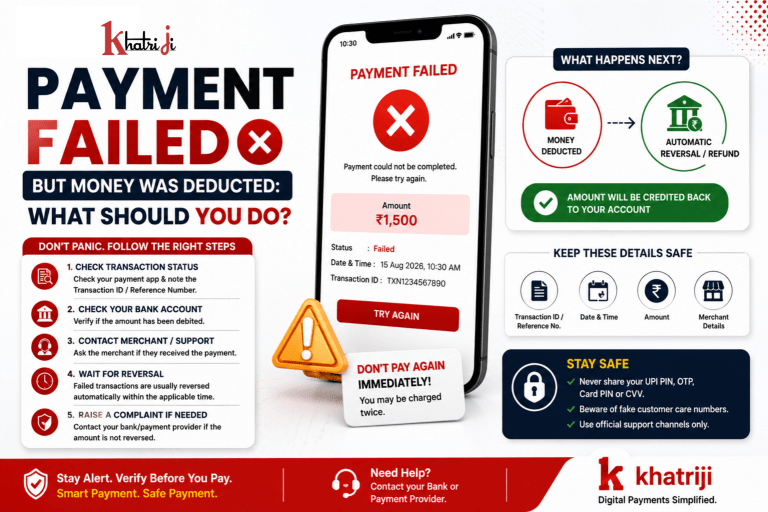
Have you ever made a UPI, debit card, credit card, or online payment and suddenly seen “Payment Failed”, even though the money was deducted from your bank account?
Don’t panic.
This situation is commonly referred to as a failed payment with a debit or a pending/reversal transaction. In many cases, the deducted amount is automatically reversed to your bank account after the payment failure is confirmed.
However, the time required for the reversal can depend on the payment method, bank, payment service provider, merchant, and transaction circumstances.
In this guide, we’ll explain:
- Why money can be deducted when a payment fails
- What happens to the deducted amount
- What you should do immediately
- How to check your transaction status
- When you should contact your bank
- How to raise a payment dispute
- What information you should keep
- How to avoid duplicate payments
- Common UPI and card-payment problems
- Frequently asked questions
Payment Failed but Money Was Deducted — What Does It Mean?
When you make a digital payment, several systems may communicate with each other.
For example:
Your Bank → Payment Network → Payment Provider → Merchant
Sometimes your bank successfully debits the amount, but the merchant does not receive a successful confirmation.
As a result, you may see:
Payment Status: Failed
while your bank statement temporarily shows:
Amount: Debited
This does not necessarily mean that your money is permanently lost.
The transaction may be waiting for reconciliation or reversal.
Why Does This Happen?
There can be several reasons for a failed payment with a debit.
1. Network Problem
A temporary internet or network problem can interrupt communication between the bank, payment app and merchant.
The payment may be processed by one system but fail to receive confirmation from another.
2. Bank Server Issue
Banks and payment networks can occasionally experience:
- Technical problems
- Server delays
- Maintenance
- High transaction volume
- Temporary connectivity issues
This can result in a failed or pending payment.
3. Payment Timeout
Sometimes a transaction takes longer than the permitted processing time.
Your bank may debit the amount, but the merchant does not receive confirmation within the required time.
The transaction may subsequently be reversed.
4. Merchant System Failure
The merchant’s payment gateway or server may experience an issue.
Your payment request may reach the banking system but fail to complete at the merchant’s end.
5. Payment Gateway Error
Online merchants often use payment gateways to process payments.
A technical problem at the gateway can result in:
Payment Failed → Amount Debited
The payment gateway and bank may later reconcile the transaction and process the reversal.
6. UPI Transaction Issue
UPI payments can occasionally fail because of:
- Bank connectivity problems
- UPI service interruptions
- Incorrect payment details
- Transaction limits
- Temporary technical issues
- Payment confirmation delays
Always check the transaction status in your payment application and bank account before attempting another payment.
What Happens to Your Money After a Failed Payment?
In many failed-payment situations, the deducted amount is automatically reversed.
The exact process depends on the payment system and the parties involved.
There are generally three possibilities:
Situation 1: Payment Failed + Amount Automatically Reversed
The transaction fails and the money returns to your bank account.
Situation 2: Payment Pending
The transaction has not received a final status yet.
You should wait for the transaction status to be updated instead of immediately making another payment.
Situation 3: Payment Failed + Reversal Not Received
If the amount does not return within the applicable timeline, you should contact the relevant bank/payment provider and raise a complaint.
What Should You Do Immediately?
If your payment failed but money was deducted, follow these steps.
Step 1: Don’t Panic
First, stay calm.
A failed payment does not automatically mean that your money is permanently lost.
Step 2: Check the Payment Status
Open the payment app or website and check the transaction.
Look for:
- Transaction status
- Transaction ID
- UPI reference number
- Order ID
- Payment amount
- Date and time
- Merchant name
The transaction may show:
Failed
Pending
Successful
or
Refund/ Reversed
Step 3: Check Your Bank Account
Don’t rely only on the payment application’s notification.
Check your bank account or bank statement to confirm whether the amount was actually deducted.
Sometimes an app may temporarily show a transaction status that changes after reconciliation.
Step 4: Don’t Make the Same Payment Again Immediately
This is extremely important.
Suppose you tried to pay ₹2,000 and the screen showed:
Payment Failed
but your bank account shows ₹2,000 deducted.
If you immediately make another ₹2,000 payment, you could potentially end up with:
First transaction: ₹2,000
plus
Second transaction: ₹2,000
if the first transaction is later completed or successfully reconciled.
Before making another payment, verify the first transaction’s final status.
Step 5: Contact the Merchant
If the payment was for a product or service, contact the merchant.
Ask:
“Did you receive the payment?”
Provide the transaction reference number if required.
The merchant may be able to confirm whether the payment was received.
Step 6: Contact Your Bank if Necessary
If the transaction failed and the money has not been reversed within the applicable timeline, contact your bank.
Provide:
- Transaction date
- Transaction time
- Amount
- Transaction/reference number
- Merchant name
- Payment method
- Screenshot, if available
Ask the bank to check the transaction and reversal status.
Step 7: Raise a Complaint Through the Payment App
If you used a UPI app or another payment service, use its official support or dispute-resolution option.
Select the relevant transaction and choose the appropriate complaint category.
For example:
Payment Failed → Amount Debited
Keep the complaint/reference number for future follow-up.
How Long Does a Failed Payment Refund Take?
There is no single universal reversal time for every payment.
The applicable timeline can vary according to:
- UPI transaction type
- Bank
- Payment network
- Card transaction
- Merchant payment gateway
- Transaction status
- Whether the merchant received the money
- Whether the transaction requires reconciliation
For this reason, users should not assume that every failed payment will be reversed within exactly the same number of hours.
If the amount does not return within the applicable timeline communicated by your bank/payment provider, raise a complaint rather than repeatedly attempting the transaction.
UPI Payment Failed but Money Deducted
This is one of the most common concerns among digital-payment users.
Suppose you scan a QR Code and pay:
₹1,500
The app displays:
Payment Failed
But your bank account shows:
₹1,500 Debited
In this situation:
- Check the UPI transaction status.
- Note the UPI transaction/reference number.
- Check your bank statement.
- Ask the merchant whether payment was received.
- Avoid making another payment immediately.
- Wait for the applicable reversal/reconciliation process.
- Contact your bank/payment provider if the amount is not reversed within the applicable timeline.
What Is a UPI Reference Number?
A UPI reference number is a transaction identifier associated with a UPI payment.
It can help the bank, payment provider and merchant identify a particular transaction.
When reporting a failed UPI transaction, keeping this number can make the complaint process easier.
You may see identifiers such as:
- UPI reference number
- Transaction ID
- RRN
- UTR
- Order ID
The exact identifier displayed can vary depending on the payment system.
What If the Merchant Says They Didn’t Receive the Money?
If the merchant says:
“We haven’t received your payment.”
but your bank account shows the amount deducted, don’t immediately pay again.
First:
Check the transaction status.
If it is still pending, wait for the final status.
If it is failed, check the expected reversal process.
If it is successful but the merchant says they haven’t received it, contact the payment provider/bank and provide the transaction reference.
What If the Merchant Received the Money but Your App Says Failed?
This situation requires special attention.
If the merchant confirms that the payment was received, don’t make another payment.
Save evidence such as:
- Payment receipt
- Transaction ID
- Merchant confirmation
- Order number
- Bank statement
Contact the merchant/payment provider if the payment status remains incorrect.
What If the Payment Is Showing “Pending”?
A pending transaction is different from a failed transaction.
Pending means the payment has not yet received a final status.
If your payment is pending:
Don’t immediately repeat the payment.
Wait for the status to update and monitor your bank account.
If the transaction remains pending beyond the applicable resolution timeline, raise a complaint through the relevant payment provider or bank.
Failed Payment vs Pending Payment
| Payment Status | Meaning | What You Should Do |
|---|---|---|
| Failed | Payment did not complete successfully | Check debit and reversal status |
| Pending | Final status has not been confirmed | Wait and monitor |
| Successful | Payment completed | Check merchant/order confirmation |
| Reversed | Deducted amount has been returned | Verify bank account |
| Refunded | Merchant/payment provider returned the amount | Check refund credit |
Understanding the status can prevent unnecessary duplicate payments.
What If Money Is Deducted Twice?
Suppose you attempted a payment twice and your bank account shows:
₹1,000 + ₹1,000 deducted
First check whether both transactions were actually successful.
If one transaction failed and the other succeeded, the failed transaction should follow the applicable reversal process.
If both transactions were successful but the merchant received only one payment, contact the merchant/payment provider regarding the duplicate transaction.
Keep both transaction reference numbers.
What Information Should You Keep?
When a payment problem occurs, save the following information:
Payment Details
- Amount
- Date
- Time
- Payment method
- Merchant name
Transaction Details
- Transaction ID
- UPI reference number
- RRN/UTR where applicable
- Order ID
Evidence
- Screenshot of payment status
- Bank statement
- Merchant receipt
- Payment confirmation
Never share your UPI PIN, OTP, card PIN, CVV or password with customer support or an unknown person.
Never Share Your UPI PIN to Get a Refund
This is one of the most important security rules.
A genuine refund does not require you to reveal your UPI PIN to another person.
A scammer may say:
“Your payment failed. Enter your UPI PIN to receive the refund.”
Be careful.
Your UPI PIN is used to authorize certain transactions. Never disclose it to someone over:
- Phone calls
- SMS
- Social media
- Remote-support applications
Beware of Fake Customer Care Numbers
When a payment fails, users often search online for customer-care numbers.
Scammers may publish fake numbers and pretend to be:
- Bank representatives
- Payment app representatives
- Merchant support agents
- Refund departments
Always use the official support channel provided by your bank, payment app or merchant.
Don’t trust random phone numbers found in comments, social media posts or suspicious websites.
Don’t Install Remote-Access Apps for a Refund
A fraudster may tell you:
“Install this app so I can process your refund.”
Don’t do it.
Remote-access or screen-sharing software can potentially allow another person to see sensitive information or control parts of your device.
For payment problems, use the official complaint/support mechanism instead.
Can a Merchant Ask for Your UPI PIN?
No.
A merchant does not need your UPI PIN to “receive” your payment.
Your UPI PIN should remain confidential.
If someone asks you to:
- Share your UPI PIN
- Tell them your OTP
- Approve an unknown collect request
- Scan a QR Code to receive money
- Install an unknown application
stop the transaction and verify the request.
Be Careful With QR Code Refund Scams
A common scam involves someone claiming:
“Scan this QR Code to receive your refund.”
Remember:
Scanning a QR Code can initiate a payment.
Don’t scan an unknown QR Code simply because someone says it will give you money.
Always verify the payment request before authorizing anything.
What If the Payment Was Made Through a Debit Card?
The process can be slightly different for card payments.
If your debit card payment fails but the amount appears deducted:
- Check the merchant order status.
- Check your bank/card transaction.
- Save the transaction reference.
- Check whether the amount is reversed.
- Contact the merchant if necessary.
- Contact your bank if the amount isn’t reversed within the applicable timeline.
Do not repeatedly retry the payment without checking the original transaction.
What If the Payment Was Made Through a Credit Card?
For credit-card transactions, check:
- Card statement
- Available credit limit
- Merchant order status
- Transaction status
- Reversal/refund status
If a failed transaction appears on your card statement, the issuer can help determine whether it is a temporary authorization, reversed transaction, or completed transaction.
What If the Payment Was Made Through Net Banking?
If you paid through net banking and the transaction failed after your account was debited:
- Check the transaction history.
- Save the transaction/reference number.
- Check whether the merchant received the payment.
- Monitor the account for reversal.
- Contact the bank if the amount is not returned within the applicable timeline.
What If the Merchant Says “Pay Again”?
Be careful.
Before making another payment, verify whether the first payment was:
- Failed
- Pending
- Successful
- Reversed
If the first transaction is still pending, paying again may create confusion or potentially result in duplicate payment.
If you must make the payment urgently, first ask the merchant whether the original amount was received and keep evidence of the first transaction.
How to Prevent Failed Payment Problems
You cannot prevent every technical failure, but you can reduce confusion by following good payment habits.
1. Maintain a Stable Internet Connection
Avoid making important payments when your connection is unstable.
2. Keep Your Payment App Updated
Use the latest version from an official app store.
3. Check Your Bank Balance
Make sure sufficient funds are available before starting the payment.
4. Check Transaction Limits
Some banks/payment methods may have transaction or daily limits.
5. Check the Recipient
Before authorizing a payment, verify the merchant or recipient name.
6. Don’t Press Pay Multiple Times
If the screen is loading, don’t repeatedly click the payment button.
7. Save Important Transaction Details
Keep the transaction ID and receipt until the transaction is completely settled.
How Khatriji Users Can Handle a Failed Payment
If you’re using a Khatriji service and a payment appears to have failed after your account was debited, follow the same basic process:
First
Check the payment status.
Second
Check your bank account.
Third
Note the transaction/reference number.
Fourth
Check whether the service/order was successfully created.
Fifth
Avoid making another payment immediately.
Sixth
Contact the appropriate official support channel with the transaction details if the issue remains unresolved.
This makes it easier to identify the transaction and investigate the issue.
Failed Payment Checklist
If your money was deducted but payment failed, use this checklist:
☐ Check payment status
☐ Check bank account
☐ Note transaction ID
☐ Note UPI reference/RRN/UTR where applicable
☐ Check merchant/order status
☐ Don’t immediately pay again
☐ Wait for applicable reversal timeline
☐ Contact official support if necessary
☐ Keep complaint/reference number
☐ Never share UPI PIN or OTP
Common Mistakes to Avoid
Mistake 1: Paying Again Immediately
This can potentially create a duplicate transaction.
Mistake 2: Assuming Money Is Permanently Lost
A failed transaction may be automatically reversed.
Mistake 3: Calling a Random Customer-Care Number
Use official support channels.
Mistake 4: Sharing OTP or UPI PIN
Never share confidential payment credentials.
Mistake 5: Scanning a QR Code for a Refund
Don’t authorize unknown payment requests.
Mistake 6: Deleting Transaction Information
Keep the transaction details until the issue is resolved.
When Should You Contact Your Bank?
Contact your bank/payment provider when:
- The transaction failed but the amount remains debited beyond the applicable reversal timeline.
- The merchant says they did not receive the payment.
- The transaction status is incorrect.
- You see an unauthorized transaction.
- The amount was deducted multiple times.
- You need to raise a formal dispute.
- You cannot identify the transaction.
When contacting support, provide complete transaction information.
What If You Don’t Recognize the Transaction?
This is different from a normal failed payment.
If you see a debit that you did not authorize:
Act quickly.
Contact your bank/payment provider through its official support channel and report the transaction.
Also:
- Secure your account.
- Change credentials if appropriate.
- Review recent transactions.
- Don’t share OTPs or PINs.
- Follow your bank’s fraud-reporting procedure.
For suspected fraud, don’t wait simply because you think the transaction might reverse.
Failed Payment: Example
Imagine you are booking a service worth ₹1,500.
You complete the payment.
The screen shows:
Payment Failed
You check your bank account and see:
₹1,500 Debited
What should you do?
Wrong approach:
Immediately pay ₹1,500 again.
Better approach:
- Check the transaction status.
- Save the transaction ID.
- Check whether the merchant received the amount.
- Monitor the bank account for reversal.
- Contact support if required.
- Make another payment only after understanding the first transaction’s status.
This simple approach can help prevent duplicate payments.
Frequently Asked Questions
Why did my payment fail when money was deducted?
A payment can fail after the bank has temporarily or successfully debited the amount because of network problems, timeouts, bank/server issues, payment gateway problems or delayed confirmation.
Will I get my money back if the payment fails?
In many cases, failed transactions are automatically reversed. The exact reversal process and timeline depend on the payment method and applicable rules.
Should I make the payment again?
Not immediately. First verify whether the original transaction is failed, pending or successful.
What if my UPI payment failed but money was deducted?
Check the UPI transaction status, bank account and transaction reference number. If the amount is not reversed within the applicable timeline, contact your bank/payment provider.
What is a UPI reference number?
It is a transaction identifier that can help payment providers and banks locate a particular UPI transaction.
What if the merchant says they did not receive my money?
Check the final transaction status. If necessary, provide the transaction reference number to the merchant and payment provider/bank.
What if my payment says pending?
Don’t immediately make another payment. Monitor the transaction until it receives a final status.
Can I share my UPI PIN with customer support?
No. Your UPI PIN is confidential and should never be shared.
Can someone send me a refund using a QR Code?
Be careful. You generally should not scan an unknown QR Code or authorize an unexpected payment request just to receive a refund.
What if I was charged twice?
Check both transaction IDs and their statuses. If both payments were successful or the duplicate amount has not been reversed, contact the merchant and payment provider/bank.
What information should I provide when raising a complaint?
Provide the amount, date, time, transaction ID/reference number, merchant details and relevant screenshots or receipts.
How can I avoid failed payment problems?
Use a stable internet connection, keep your payment application updated, check transaction limits, verify recipient details and avoid repeatedly clicking the payment button.
Final Takeaway
Seeing “Payment Failed” after your bank account has been debited can be stressful, but it does not automatically mean that your money is gone permanently.
The most important thing is not to panic and not to immediately make the same payment again.
Instead:
Check → Verify → Save Details → Wait for Reversal → Contact Official Support if Needed
Always check the transaction status, keep your transaction/reference number, and monitor your bank account.
Most importantly, protect your payment credentials. Never share your UPI PIN, OTP, card PIN or CVV with anyone, even if they claim they are helping you get a refund.
For Khatriji users, keeping accurate transaction details and using official support channels can make payment-related issues easier to investigate and resolve.
Khatriji — making digital services simpler, while helping users stay informed and payment-aware.
Also Read:-
How to Check Your Khatriji Transaction History
How to Identify Fake Payment Links
Tags: Digital Payment Safety, Failed UPI Transaction, khatriji, Money Deducted Payment Failed, Online Payment Problems, Payment Failed Money Deducted, Payment Pending, Payment Reversal, UPI Payment Failed, UPI Refund, UPI Transaction Complaint