
Debit cards have made online payments quick, convenient, and accessible. Whether you are shopping online, paying bills, booking travel, or using digital services, a debit card allows you to pay directly from your bank account.
However, convenience also comes with security risks.
Fake websites, phishing links, fraudulent calls, fake customer-care numbers, malicious apps, and card-data theft can put your money at risk if you are not careful.
The good news is that you can significantly reduce these risks by following a few simple security practices.
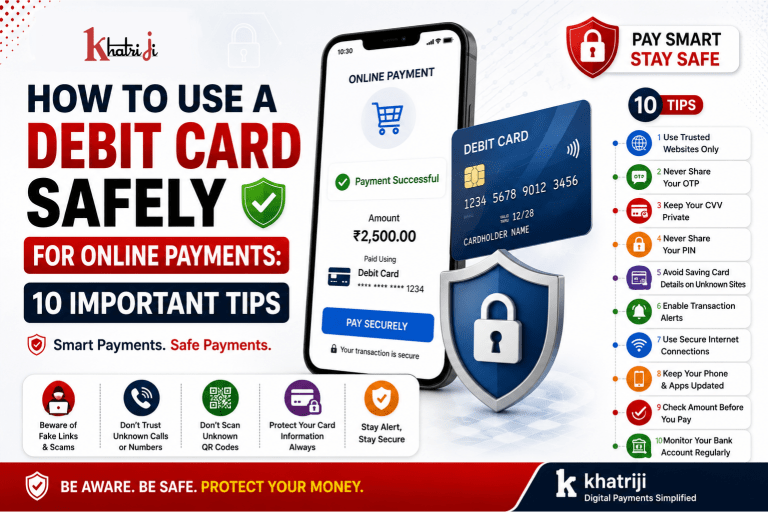
In this guide, we will discuss 10 important tips for using your debit card safely for online payments, along with common mistakes to avoid and what to do if you suspect a fraudulent transaction.
Why Is Debit Card Security Important?
A debit card is directly connected to your bank account.
When an unauthorized debit-card transaction occurs, money may be deducted from your available bank balance.
That is why protecting your:
- Debit card number
- Expiry date
- CVV
- PIN
- OTP
- Banking credentials
is extremely important.
You should treat your debit-card information as confidential financial information.
10 Tips to Use Your Debit Card Safely Online
1. Use Only Trusted Websites
Before entering your debit-card information, make sure you are using the genuine website of the merchant or service provider.
Check:
- Website address
- Domain name
- HTTPS connection
- Website spelling
- Company information
- Contact details
Be especially careful with websites that have unusual domain names or suspicious-looking URLs.
A fake website can be designed to look almost identical to a genuine website.
Quick Tip
Don’t click a payment link simply because it looks professional.
If you receive a payment link through SMS, email or WhatsApp, verify the website independently before making a payment.
2. Never Share Your OTP
An OTP is an important security layer used during many online transactions.
You should never share your OTP with another person.
A scammer may call you and say:
“We need your OTP to complete your payment.”
Don’t share it.
Legitimate banks and payment services generally do not require you to reveal an OTP over a phone call.
Remember:
OTP = Confidential
Never share it with:
- Unknown callers
- WhatsApp contacts
- Social-media accounts
- Fake customer-care agents
- Delivery scammers
- Refund scammers
3. Never Share Your CVV
Your card’s CVV is sensitive information.
Never share your CVV through:
- Phone calls
- SMS
- Social media
- Unknown websites
If someone asks for your CVV to process a refund or activate a service, be cautious.
Always verify the request through an official channel.
4. Don’t Share Your Debit Card PIN
Your debit-card PIN should remain private.
Never tell your PIN to anyone, even if they claim to be:
- A bank employee
- Customer-care representative
- Merchant
- Delivery agent
- Payment-support executive
Your PIN should be entered only through a legitimate and secure payment interface when required.
Important:
No genuine support agent should need to know your PIN.
5. Avoid Saving Card Details on Unknown Websites
Many websites allow you to save your debit-card details for faster checkout.
This can be convenient, but you should be selective.
Avoid saving your card information on:
- Unknown websites
- Temporary shopping websites
- Suspicious apps
- Websites you don’t regularly use
If you don’t need the card to be saved, consider entering the details when required instead.
6. Enable Bank Transaction Alerts
Transaction notifications can help you detect unauthorized activity quickly.
Enable alerts provided by your bank for transactions where available.
Depending on your bank, you may receive:
- SMS alerts
- Email alerts
- Mobile-app notifications
If you receive an alert for a transaction you don’t recognize, investigate it immediately through your bank’s official channels.
7. Use Secure Internet Connections
Avoid making important financial transactions over unsecured public Wi-Fi networks.
For example, be cautious when using:
- Public Wi-Fi
- Unknown hotspots
- Shared networks
- Unsecured connections
For sensitive payments, preferably use your trusted mobile data or secure private network.
8. Keep Your Phone and Apps Updated
Your phone is often used for:
- Banking
- OTPs
- Payment apps
- Online shopping
Keep your device and important applications updated.
Updates can include security improvements and bug fixes.
Also:
- Use a screen lock
- Install apps from official app stores
- Remove apps you no longer use
- Avoid installing unknown APK files
- Don’t give unnecessary permissions to apps
9. Check the Payment Amount Before Confirming
Before completing a payment, carefully check:
- Merchant name
- Amount
- Currency
- Order details
- Website/app
- Payment description
Don’t approve a transaction simply because you are in a hurry.
For example, if you intend to pay:
₹999
but the payment screen displays:
₹9,999
stop and verify the transaction.
A few seconds of checking can prevent a costly mistake.
10. Monitor Your Bank Account Regularly
Don’t wait until the end of the month to review your transactions.
Regularly check your:
- Bank balance
- Debit-card transactions
- Account statement
- Online banking activity
Look for transactions that you don’t recognize.
If you find something suspicious, contact your bank through its official fraud-reporting or customer-support channel as soon as possible.
How to Identify a Fake Payment Website
Scammers often create websites that look similar to genuine websites.
Before making a payment, check the URL carefully.
Warning signs include:
- Strange domain name
- Spelling mistakes
- Too many pop-ups
- Unusual payment instructions
- Suspicious offers
- Missing company information
- Poor-quality website design
- Requests for unnecessary card information
- Pressure to make an immediate payment
Don’t assume that a website is genuine just because it has a professional design.
Beware of Fake Payment Links
You may receive messages such as:
“Your order is pending. Click here to complete payment.”
or:
“Your account will be blocked. Pay immediately.”
These messages can be used for phishing.
Don’t click suspicious links.
Instead, open the official website or app yourself and check whether the payment is actually required.
Be Careful With Fake Refund Calls
Refund scams are common because people naturally want their money back quickly.
A scammer may say:
“Your payment failed. We are calling to process your refund.”
They may then request:
- OTP
- CVV
- Card number
- PIN
- Banking password
- Screen sharing
- Remote-access software
Do not provide these details.
If you are expecting a refund, verify it through the merchant’s official app or website.
Don’t Install Remote-Access Apps for Payment Support
A fraudster may ask you to install a remote-access or screen-sharing application.
They might say:
“Install this app and we will help you complete your refund.”
Avoid doing this unless you fully understand the situation and are dealing with a trusted, verified support process.
Never give an unknown person control of your phone or computer during a financial transaction.
Be Careful With QR Code Scams
QR Codes are convenient, but scammers can misuse them.
Someone may tell you:
“Scan this QR Code to receive money.”
Be careful.
Scanning a QR Code can lead to a payment request or other action.
Before authorizing a transaction, always check:
- Who is requesting the payment?
- What amount is displayed?
- What is the recipient/merchant name?
- Why are you being asked to authorize it?
Never approve a payment request simply because someone says it is required to receive a refund or payment.
Debit Card vs Credit Card for Online Payments
Both debit and credit cards can be used for online transactions, but they work differently.
| Feature | Debit Card | Credit Card |
|---|---|---|
| Money source | Linked bank account | Credit line |
| Immediate account impact | Usually yes | Usually no direct bank-account debit |
| Online payment convenience | High | High |
| Fraud monitoring | Important | Important |
| Security precautions | Essential | Essential |
| OTP protection | Important | Important |
| CVV protection | Important | Important |
Regardless of the card type, you should follow good payment-security practices.
What Should You Do If Your Debit Card Details Are Compromised?
If you think someone has obtained your card details, don’t ignore it.
Take appropriate action through your bank’s official channels.
Depending on the situation, you may need to:
- Contact your bank.
- Report the suspicious activity.
- Block or temporarily disable the card if your bank provides that option.
- Review recent transactions.
- Change relevant banking credentials if necessary.
- Follow your bank’s fraud-reporting procedure.
- Monitor your account for further suspicious activity.
Acting quickly can help reduce further risk.
What If You See an Unauthorized Debit Card Transaction?
If you notice a transaction that you did not make:
Step 1: Check the Transaction
Make sure it isn’t a transaction made by a family member or a recurring payment you forgot about.
Step 2: Contact Your Bank
Use your bank’s official customer-care or fraud-reporting channel.
Step 3: Secure Your Card
If necessary, block or disable the card using your bank’s official method.
Step 4: Report the Transaction
Provide the transaction details requested by your bank.
Step 5: Keep the Complaint Number
Save the complaint/reference number for future communication.
Don’t Trust Random Customer-Care Numbers
One of the biggest mistakes people make after a payment problem is searching for customer-care numbers on random websites or social media.
Scammers sometimes publish fake numbers and pretend to represent banks or payment companies.
Always find customer support through:
- Official bank website
- Official banking application
- Official card documentation
- Verified official communication
Avoid random numbers shared in comments or social-media posts.
Safe Debit Card Payment Checklist
Before making an online payment, ask yourself:
☑ Am I on the genuine website?
☑ Is the website address correct?
☑ Is the payment amount correct?
☑ Is the merchant name correct?
☑ Do I understand what I am paying for?
☑ Am I using a secure internet connection?
☑ Am I keeping my OTP private?
☑ Am I keeping my CVV private?
☑ Am I keeping my PIN private?
☑ Do I know how to contact my bank if something goes wrong?
If something feels suspicious, stop the payment and verify first.
Common Debit Card Security Mistakes
Mistake 1: Sharing OTP
Never share your OTP with anyone.
Mistake 2: Sharing CVV
Your CVV is sensitive card information.
Mistake 3: Sharing PIN
Your PIN should remain confidential.
Mistake 4: Clicking Unknown Payment Links
Verify the payment request independently.
Mistake 5: Trusting Fake Customer Support
Use official support channels.
Mistake 6: Ignoring Bank Alerts
Review unexpected transaction notifications.
Mistake 7: Making Payments in a Hurry
Always verify the amount and merchant before confirming.
Mistake 8: Installing Unknown Apps
Avoid unknown APKs and suspicious applications.
How Khatriji Users Can Make Safer Online Payments
If you use Khatriji services and need to make an online payment, follow basic digital-payment safety practices.
Before making a payment:
Verify the Website or App
Make sure you are using the correct Khatriji platform and not a fake website.
Verify the Amount
Check the amount before confirming the payment.
Protect Your Card Details
Never share your debit-card number, CVV, PIN or OTP with another person.
Save Transaction Details
Keep your:
- Transaction ID
- Order ID
- Payment receipt
- Date and time
- Amount
until the transaction is successfully completed.
Use Official Support
If you experience a payment problem, use Khatriji’s official support channel rather than contacting an unknown number.
Example: Safe Debit Card Payment
Suppose you want to make a payment of ₹2,500 online.
Before clicking the final payment button:
Check 1
Is the website genuine?
Check 2
Is the merchant name correct?
Check 3
Does the amount show ₹2,500?
Check 4
Is the payment page secure and expected?
Check 5
Are you keeping your OTP private?
If everything looks correct, complete the transaction.
After payment, save the receipt and transaction reference.
What Should You Never Share?
For your financial safety, never casually share:
Debit Card Number
Keep your full card number private.
CVV
Never reveal your CVV to unknown people.
PIN
Never tell anyone your card PIN.
OTP
Never disclose an OTP received on your phone.
Banking Password
Never share your online-banking password.
UPI PIN
Never share your UPI PIN.
Remember:
A genuine bank or payment-support representative should not ask you to reveal confidential authentication credentials over a phone call.
10-Point Debit Card Safety Checklist
Here is a quick summary:
- Use trusted websites.
- Check the URL carefully.
- Never share OTP.
- Never share CVV.
- Never share your PIN.
- Avoid unknown payment links.
- Use secure internet connections.
- Keep your phone and apps updated.
- Verify the payment amount and merchant.
- Monitor your bank account regularly.
Frequently Asked Questions
Is it safe to use a debit card for online payments?
Yes, debit cards can be used safely online when you use trusted websites, protect your card information, keep your OTP and PIN private, and monitor your bank transactions.
Should I share my CVV with customer care?
No. Do not share your CVV with unknown people or unverified customer-care representatives.
Can I share my OTP with a bank employee?
You should not disclose your OTP over a phone call simply because someone claims to be a bank employee. Follow your bank’s official security guidance.
Should I save my debit-card details on websites?
Only consider saving card details on trusted services that you regularly use. Avoid saving them on unfamiliar websites.
Is public Wi-Fi safe for online banking?
Public Wi-Fi can introduce security risks. For sensitive banking and payment activities, preferably use a trusted private connection.
What should I do if I receive an unknown transaction alert?
Contact your bank through an official channel and follow its fraud-reporting procedure. If appropriate, secure or block the card.
What if someone asks me to install an app for a refund?
Be extremely cautious. Don’t install unknown applications or provide remote access to your device for an unsolicited refund request.
Is scanning a QR Code always safe?
No. Verify the payment request, recipient and amount before authorizing any transaction.
What if I accidentally entered my card details on a fake website?
Contact your bank through its official channel as soon as possible and follow its recommendations for securing the card and account.
How can I make online payments safer?
Use trusted websites, verify URLs and amounts, protect OTP/CVV/PIN, keep devices updated, avoid suspicious links and monitor your bank account.
Final Takeaway
Online payments make everyday life easier, but debit-card security should always be a priority.
The most important rule is simple:
Never share your OTP, CVV, PIN, UPI PIN or banking password with anyone.
Before making an online payment, verify the website, merchant and amount.
Avoid suspicious payment links, fake customer-care numbers, unexpected refund calls and unknown QR Codes.
If you notice an unauthorized transaction, contact your bank through its official channel as soon as possible.
For Khatriji users, the same principle applies: verify before you pay, protect your payment credentials, save transaction details and use official support channels when you need help.
Stay Alert. Pay Safely. Protect Your Money.
Khatriji — One App, Many Services.
Tags: CVV Safety, Debit Card Fraud, Debit Card PIN, Debit Card Safety, Debit Card Security, Digital Payment Safety, khatriji, Online Payment Fraud, Online Payment Safety, OTP Safety, Payment Security, Safe Online Payments