
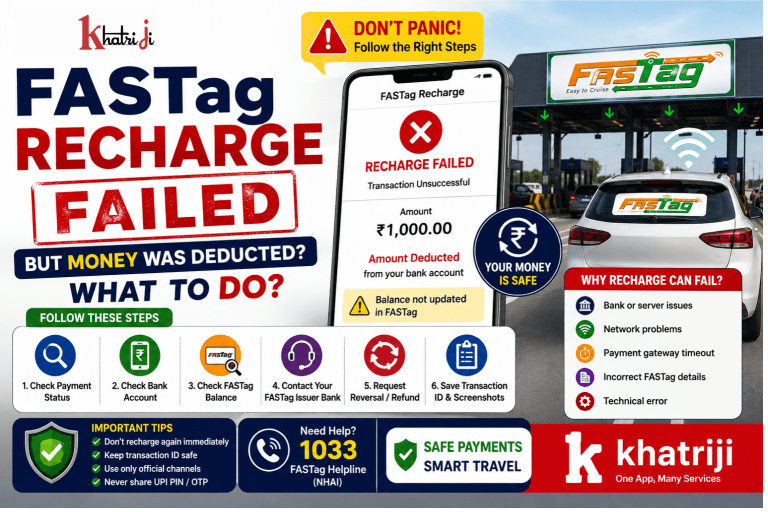
FASTag recharge failed but money deducted can be frustrating, especially when your bank account shows the payment as successful but your FASTag balance has not been updated. This can happen because of a payment processing issue, bank server problem, or delay in updating the FASTag account. In this guide, we explain how to check your recharge status, verify your FASTag balance, request a reversal, and contact your bank or FASTag issuer.
However, sometimes a FASTag recharge can fail even though money has already been deducted from your bank account or UPI account. This can be confusing, especially when you are travelling and need sufficient FASTag balance.
If this happens to you, do not immediately make another recharge. First, check the transaction status and FASTag balance, keep your transaction reference number, and contact the appropriate bank or FASTag issuer if the amount has not been credited.
This guide explains what to do when your FASTag recharge fails but your money has been deducted.
What Does “FASTag Recharge Failed but Money Deducted” Mean?
A typical FASTag recharge involves three stages:
- You enter your FASTag/vehicle details.
- You make the payment through UPI, debit card, credit card, net banking or another supported payment method.
- The recharge amount is credited to your FASTag account.
Sometimes the payment is successfully debited from your bank account, but the recharge does not appear in your FASTag balance.
For example:
You attempt to recharge your FASTag with ₹1,000. The payment shows as successful or the amount is deducted from your bank account, but your FASTag balance remains unchanged.
This is generally a payment/reconciliation issue, and you should avoid paying again until you understand the status of the first transaction.
Why Can FASTag Recharge Fail After Money Is Deducted?
There can be several reasons for this situation.
1. Payment Gateway Issue
The payment gateway may successfully debit your account but fail to communicate the final status to the FASTag issuer.
2. Bank Server Delay
Your bank may process the debit immediately while the FASTag system takes longer to receive or reconcile the transaction.
3. FASTag Issuer Server Problem
The issuing bank’s FASTag system may temporarily be unavailable or experiencing technical problems.
4. UPI Transaction Delay
A UPI payment can sometimes remain pending or take additional time to reach the intended beneficiary/account.
5. Incorrect FASTag Details
If incorrect vehicle or FASTag information was entered, the recharge may not be credited as expected.
6. Temporary Technical Failure
Internet connectivity, payment gateway interruptions, or server maintenance can cause a transaction to fail during processing.
What Should You Do If FASTag Recharge Failed but Money Was Deducted?
Follow these steps carefully.
Step 1: Don’t Recharge Again Immediately
The first thing you should do is avoid making another recharge immediately.
If the first transaction is still being processed, making another payment could result in unnecessary confusion.
Wait until you have checked the status of the original transaction.
Step 2: Check Your Bank or UPI Transaction Status
Open the bank or UPI application that you used for the recharge.
Check whether the transaction is showing as:
- Successful
- Pending
- Failed
- Reversed
- Refunded
Also check:
- Transaction amount
- Transaction date and time
- Transaction/reference ID
- FASTag/vehicle details
- Beneficiary information, where applicable
Take a screenshot of the transaction if necessary.
Step 3: Check Your FASTag Balance
Next, check your FASTag account through your issuing bank’s FASTag portal/app or another official FASTag channel.
If the recharge amount has been credited, you generally don’t need to initiate another payment.
If the bank account was debited but the FASTag balance has not increased, continue with the next steps.
IHMCL’s FAQ specifically states that when a FASTag recharge amount is debited from the customer’s account but is not credited to the FASTag account, the customer should contact the bank call centre and raise a request for reversal.
Step 4: Contact Your FASTag Issuing Bank
This is one of the most important steps.
Your FASTag is generally associated with an issuing bank or FASTag account provider. Contact its customer support and explain:
“My FASTag recharge amount was debited from my bank account, but the amount was not credited to my FASTag account.”
Keep the following information ready:
- Registered mobile number
- Vehicle registration number
- FASTag details
- Recharge amount
- Date and time of transaction
- Transaction/reference ID
- UPI transaction ID, if applicable
- Bank statement/payment screenshot
According to NHAI and IHMCL FASTag FAQs, customers whose recharge amount was debited but not credited should contact their bank call centre and raise a reversal request.
Step 5: Raise a Reversal/Refund Request
When contacting your bank, specifically ask them to check the debit transaction and raise a reversal/refund request if the FASTag recharge was not credited.
Don’t simply report that your recharge “failed.”
Clearly mention:
Money deducted + FASTag not credited.
This helps customer support understand that the issue concerns a debit without corresponding FASTag credit.
Step 6: Keep Your Transaction ID Safe
Your transaction ID/reference number is extremely important.
It helps the bank/payment provider locate the transaction.
You may need it when:
- Raising a complaint
- Calling customer care
- Following up on a refund
- Checking transaction status
- Providing proof of payment
Never delete the transaction details until the issue is completely resolved.
Step 7: Check Your Bank Statement
If you are unsure whether the money was actually deducted, check your bank statement.
Look for the corresponding debit entry.
For example:
| Details | Example |
|---|---|
| Recharge Amount | ₹1,000 |
| Payment Status | Debited |
| FASTag Credit | Not Received |
| Transaction ID | TXN123456789 |
| Date | 05 September 2026 |
If the bank statement confirms the debit but the FASTag balance hasn’t increased, provide this information to the FASTag issuer.
What If the Recharge Later Gets Credited?
Sometimes a transaction may initially appear unsuccessful but be credited later.
Therefore, check your FASTag balance before making another recharge.
If the original ₹1,000 recharge eventually reaches your FASTag account and you have already made another ₹1,000 recharge, your balance could become higher than you intended.
So, always verify the first transaction before retrying.
What If the Money Is Automatically Reversed?
In some failed transactions, the amount may be automatically returned to your bank account.
Your transaction history may show statuses such as:
- Reversed
- Refunded
- Reverted
- Failed
- Amount credited back
If the money has already been returned, you can make a fresh FASTag recharge if required.
However, verify the refund in your bank account rather than relying only on a notification.
Can You Recharge FASTag Again?
Yes, you can recharge again after confirming that the previous transaction has failed, been reversed, or otherwise will not be credited.
Before making another recharge, check:
- Previous transaction status
- FASTag balance
- Bank account debit/refund status
- Transaction history
This can help prevent duplicate payments.
IHMCL currently notes that FASTag users can use multiple supported payment methods, including UPI, net banking and cards, depending on the FASTag arrangement.
How to Avoid FASTag Recharge Problems
1. Use the Correct FASTag Details
Always verify your:
- Vehicle registration number
- FASTag account
- Issuing bank
- Recharge amount
before confirming payment.
2. Verify the Payment Before Closing the App
After completing the recharge, check whether the transaction shows as successful.
Don’t immediately close the application if the status is still processing.
3. Keep Transaction Records
Save important transaction information until the recharge is confirmed.
Useful information includes:
- Transaction ID
- Amount
- Date/time
- Payment method
- Screenshot
- FASTag balance
4. Maintain Sufficient FASTag Balance Before Travelling
Don’t wait until you are approaching a toll plaza to recharge.
Recharge your FASTag in advance, especially before:
- Long-distance journeys
- Weekend trips
- Festivals
- Holidays
- Highway travel
This gives you time to resolve any failed transaction before reaching the toll plaza.
5. Use Trusted Payment Platforms
Use your FASTag issuer’s official channels or a trusted payment service.
Avoid suspicious websites, unknown apps, or links received through unsolicited messages.
What If the Toll Amount Was Deducted Incorrectly?
A failed recharge is different from an incorrect toll deduction.
If you believe that the wrong toll amount was deducted from your FASTag account, IHMCL says users can report an incorrect deduction through its call centre within 40 days of the transaction date. Its FAQ states that a chargeback may be raised through the bank, and the chargeback process normally takes 20–30 working days when the case is proven.
Therefore, don’t confuse:
Recharge problem:
Money deducted from your bank account → FASTag not credited.
Toll deduction problem:
FASTag balance deducted → incorrect toll amount charged.
They may require different complaint processes.
FASTag Recharge Failed: Example
Suppose Rahul wants to recharge his FASTag.
He enters:
Recharge amount: ₹500
He pays using UPI.
His bank shows:
₹500 Debited
But his FASTag balance does not change.
What should Rahul do?
He should:
- Not immediately make another ₹500 payment.
- Check the UPI transaction status.
- Check the FASTag balance.
- Save the transaction/reference ID.
- Contact the FASTag issuing bank.
- Explain that ₹500 was debited but the FASTag account was not credited.
- Request the bank to investigate and raise a reversal request if necessary.
This is much safer than repeatedly attempting the recharge.
FASTag Recharge Failed vs Pending vs Successful
Understanding transaction statuses can help.
| Status | Meaning | What to Do |
|---|---|---|
| Successful | Payment completed | Check FASTag balance |
| Pending | Transaction is still being processed | Wait and monitor |
| Failed | Payment wasn’t completed | Check whether money was debited |
| Debited but not credited | Bank account debited but FASTag not credited | Contact issuing bank |
| Reversed | Money returned | Recharge again if needed |
| Refunded | Amount returned to account | Verify refund |
The exact status terminology can differ between banks and payment applications.
What Information Should You Give Customer Support?
When contacting your FASTag issuer, provide complete information.
Customer details
- Registered mobile number
- Vehicle registration number
- FASTag account information
Transaction details
- Recharge amount
- Date
- Time
- Transaction ID
- UPI reference number, if applicable
- Payment method
Supporting proof
- Payment screenshot
- Bank statement
- FASTag balance screenshot
- Error message screenshot
Providing complete information can make it easier for customer support to trace the transaction.
Can Khatriji Help With FASTag Recharge?
If you use Khatriji for supported FASTag recharge services, always verify the transaction status after payment and keep your transaction reference details until the recharge is confirmed.
You can also use the Khatriji App to access supported services conveniently from your mobile.
For any transaction where your bank account is debited but the FASTag balance is not updated, first verify the transaction status and then contact the relevant FASTag/payment service provider for resolution.
FASTag Recharge Safety Tips
Keep these points in mind:
- Never share your UPI PIN with anyone.
- Never share your OTP.
- Don’t provide your banking password to customer-support callers.
- Don’t install an unknown app to receive a refund.
- Don’t scan an unknown QR code for a refund.
- Don’t click suspicious recharge/refund links.
- Always verify the official customer-care number.
- Keep transaction IDs until the issue is resolved.
Remember: a genuine refund does not require you to disclose your UPI PIN.
Frequently Asked Questions
What should I do if FASTag recharge failed but money was deducted?
First check the payment status and FASTag balance. If the amount was debited but not credited to FASTag, contact your FASTag issuing bank and raise a reversal/refund request.
Should I recharge FASTag again?
Not immediately. First check whether the original transaction is pending, successful, reversed or refunded.
How do I prove that money was deducted?
Use your bank statement, UPI transaction details, payment receipt and transaction/reference ID.
Who should I contact for a FASTag recharge issue?
Generally, contact the FASTag issuing bank/payment provider associated with the recharge. IHMCL specifically advises customers to contact their bank call centre when the recharge amount has been debited but not credited.
What if the recharge amount is credited later?
If the original recharge is eventually credited, don’t make another recharge unless you actually need additional balance.
What is the FASTag helpline?
NHAI/IHMCL materials identify 1033 as the FASTag helpline for relevant FASTag/toll assistance.
For bank-specific recharge problems, however, your FASTag issuer’s customer-care channel may be the appropriate first point of contact.
How long can an incorrect toll deduction take to be resolved?
IHMCL states that an incorrect toll deduction chargeback normally takes up to 20–30 working days, where the case is proven.
Conclusion
A FASTag recharge failure after money has been deducted can be stressful, but you don’t necessarily need to pay again immediately.
The safest approach is:
Check payment status → Check FASTag balance → Save transaction ID → Contact the issuing bank → Request reversal/refund if the recharge was not credited.
Most importantly, keep your transaction details and avoid sharing sensitive banking information such as your UPI PIN, OTP or password with anyone.
FASTag is designed to make highway toll payments quick and convenient, and maintaining sufficient balance before travelling can help you avoid unnecessary payment problems.
Tags: digital payments, FASTag, FASTag Failed Transaction, FASTag Payment, FASTag Recharge, FASTag Refund, khatriji, online payment, Payment Safety, Toll Payment