
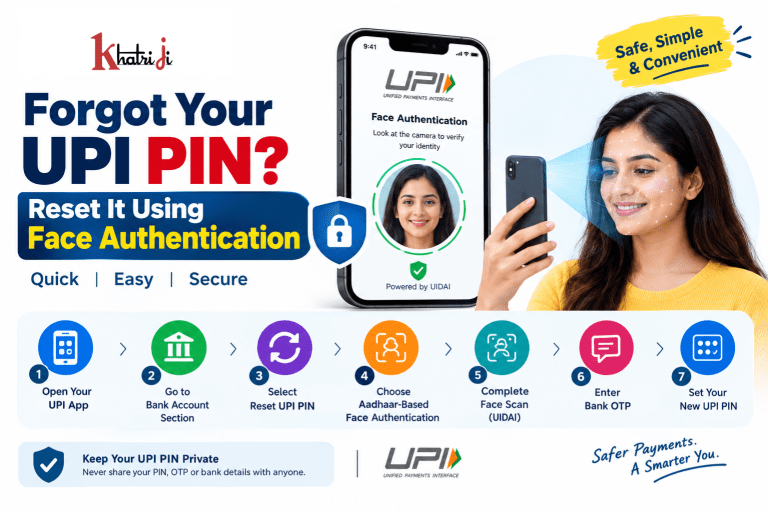
Forgetting your UPI PIN can be frustrating, especially when you need to make an urgent payment. Traditionally, resetting a UPI PIN generally involved verifying debit-card details or using Aadhaar OTP. But UPI now supports an additional option: Aadhaar-based Face Authentication for setting or resetting a UPI PIN, where the user’s face is verified through UIDAI’s authentication system.
This can make the PIN reset process easier for users who have difficulty accessing or remembering their debit-card details.
In this guide, we will explain how to reset a forgotten UPI PIN using face authentication, what you need before starting, how the process works, what to do if the option is unavailable, and important safety precautions.
What Is a UPI PIN?
A UPI PIN is a 4- or 6-digit personal identification number used to authorize UPI transactions. It is different from your bank’s ATM PIN or MPIN.
The UPI PIN is used when you authorize eligible UPI payments from your bank account. NPCI specifically advises users never to share their UPI PIN with anyone, including people claiming to be bank or customer-support representatives.
For example, if your UPI PIN is:
123456
you should never disclose it to another person, even if they say they need it to help reset your PIN or process a refund.
Can You Reset a Forgot UPI PIN Using Face Authentication?
Yes, where the feature is supported by your UPI app and bank.
NPCI has introduced Aadhaar-based Face Authentication as an additional option for UPI PIN set/reset. The process uses UIDAI’s Face Authentication system rather than requiring you to enter your debit-card credentials for the PIN reset flow.
However, the option may not appear in every UPI app or for every bank account. Availability depends on implementation and eligibility by the participating UPI app, PSP bank and issuer bank.
So, if you don’t see an option such as “Aadhaar-based Face Authentication”, you should use another reset method supported by your bank/app.
What You Need Before Resetting Your UPI PIN
Before starting, make sure you have the following:
1. A supported UPI app
Use the UPI app where your bank account is registered.
2. Your registered mobile number
Your bank account and UPI registration generally depend on the mobile number registered with your bank.
3. Aadhaar linked to your bank account
For Aadhaar-based Face Authentication, NPCI’s process requires verification that Aadhaar is linked to the bank account.
4. A compatible smartphone
Your phone needs to support the required authentication process and camera functionality.
5. UIDAI Face RD support
The face-authentication flow can redirect you to the UIDAI Face RD app/service for facial verification.
6. Access to your registered mobile number
A bank OTP may be required during the process.
How to Forgot Your UPI PIN Using Face Authentication
The exact menu names can vary between UPI apps, but the general process is as follows.
Step 1: Open Your UPI App
Open the UPI application where your bank account is registered.
Log in if required.
Step 2: Go to Your Profile or Bank Account Section
Open your profile or the Bank Account section.
Look for an option such as:
- Bank Account
- UPI Settings
- UPI PIN
- Set UPI PIN
- Reset UPI PIN
- Change UPI PIN
The exact wording may differ depending on the app.
Step 3: Select “Reset UPI PIN”
Choose the bank account for which you have forgotten the PIN.
Then select:
Reset UPI PIN
NPCI’s existing UPI guidance also provides a reset flow through the bank-account section of a UPI app.
Step 4: Choose Aadhaar-Based Face Authentication
If your bank and UPI app support the feature, you may see an option similar to:
Aadhaar-based Face Authentication
Select this option.
NPCI introduced UIDAI Face Authentication as an additional method for UPI PIN set/reset, alongside existing methods.
Step 5: Confirm Your Aadhaar-Bank Account Link
The system will verify your eligibility.
You may need to confirm that your Aadhaar is linked with the bank account being used for UPI PIN reset.
If the required linkage or eligibility check fails, you may need to use another PIN-reset method supported by your bank.
Step 6: Complete Face Authentication
The UPI app may redirect you to the UIDAI Face RD authentication flow.
Follow the instructions shown on your phone.
Typically, you will need to:
- Allow the required camera permission.
- Position your face correctly.
- Look at the camera.
- Complete the face scan.
- Wait for authentication to finish.
NPCI’s published process specifically describes redirecting to the UIDAI Face RD app/service and performing a face scan.
Step 7: Enter the Bank OTP
After successful authentication, you may receive an OTP on your registered mobile number.
Enter the OTP in the UPI app when prompted.
The NPCI-described flow includes bank OTP verification after the face-authentication step.
Step 8: Create a New UPI PIN
Enter your new UPI PIN.
Depending on your bank/app, it will generally be a 4- or 6-digit PIN.
Choose a PIN that you can remember but that isn’t obvious to others.
Step 9: Confirm Your New PIN
Enter the new PIN again.
If both entries match and all authentication checks are successful, your new UPI PIN will be activated.
UPI PIN Reset Using Face Authentication: Quick Flow
The complete process can be summarized as:
UPI App → Profile/Bank Account → Reset UPI PIN → Aadhaar Face Authentication → Aadhaar/Eligibility Verification → UIDAI Face Scan → Bank OTP → New UPI PIN → Confirm PIN
NPCI’s official process follows this general sequence.
What If “Face Authentication” Is Not Available?
Don’t worry if you cannot find the face-authentication option.
The feature is an additional authentication option, and existing UPI PIN reset methods can continue to be available. NPCI’s 2025 circular explicitly describes UIDAI Face Authentication as an additional option rather than the only reset method.
Depending on your bank and UPI app, you may be asked to reset your PIN using:
Debit Card Verification
A traditional method can involve entering details such as:
- Last six digits of your debit card
- Debit-card expiry date
- OTP
- New UPI PIN
NPCI’s UPI guidance documents this conventional reset flow.
Aadhaar OTP
Some UPI apps/banks may also provide Aadhaar-based OTP verification as an available method.
The exact choices depend on your bank and UPI application.
Face Authentication vs Debit Card Reset
| Feature | Face Authentication | Debit Card Method |
|---|---|---|
| Debit-card details | Generally not required for this authentication route | Usually required |
| Face scan | Required | Not required |
| Aadhaar | Required for Aadhaar-based face authentication | Not necessarily required for the card route |
| Bank OTP | May be required | Usually required |
| Smartphone camera | Required | Not required for the card verification itself |
| Availability | Depends on app/bank support | Commonly supported |
| Convenience | Useful if you don’t have card details available | Useful if card details are available |
The face-authentication method is intended as an additional way to set or reset the UPI PIN; it does not automatically replace every existing reset method.
Is UPI Face Authentication the Same as Phone Face Unlock?
No.
This is an important distinction.
Your phone’s normal Face Unlock feature is a device-security mechanism. Aadhaar-based UPI PIN reset uses UIDAI Face Authentication as part of the authentication process.
So:
Phone Face Unlock ≠ Aadhaar-based UPI Face Authentication
The latter is specifically designed as an authentication option for UPI PIN set/reset.
Why Is Face Authentication Useful for UPI PIN Reset?
1. You Don’t Need to Remember Your Old PIN
If you have completely forgotten your existing UPI PIN, the reset process allows you to establish a new one after successful authentication.
2. It Can Reduce Dependence on Card Details
For users who have difficulty finding or accessing their debit card details, Aadhaar-based face authentication can provide another route where supported.
NPCI has described the feature as a way to make UPI PIN setup/reset simpler and more accessible.
3. It Can Be More Convenient
Instead of manually entering multiple card details, eligible users can complete the face-authentication process through the supported flow.
4. It Can Improve Accessibility
NPCI has highlighted Aadhaar-based face authentication as part of efforts to simplify digital-payment experiences, including for users who may have difficulty using traditional authentication methods.
Important Safety Tips When Resetting Your UPI PIN
Resetting your UPI PIN is a security-sensitive process. Follow these precautions.
Never Share Your UPI PIN
Your UPI PIN should remain private.
No legitimate person helping you with a payment should need to know your UPI PIN.
NPCI explicitly advises users not to share it.
Never Share an OTP With Another Person
An OTP received during the reset process is for authentication.
Do not tell it to someone over:
- Phone calls
- SMS
- Social media
- Remote-support applications
Don’t Install an Unknown APK
A fraudster may tell you:
“Install this app to reset your UPI PIN.”
Do not do this.
Use only your official UPI application and the authentication flow presented by the app.
Don’t Allow Remote Access
Avoid giving unknown people access through applications such as remote desktop or screen-sharing tools.
A person claiming to be from a bank or payment company should not need remote control of your phone to help you reset your PIN.
Check the App Carefully
Before entering sensitive information, make sure you are using the legitimate UPI application.
Avoid downloading payment apps from unknown websites.
What Happens If You Enter the Wrong UPI PIN Multiple Times?
If you enter an incorrect UPI PIN repeatedly, your bank may temporarily restrict UPI transactions from your account.
The exact behavior can vary between banks. NPCI notes that repeated incorrect PIN attempts may result in temporary blocking of UPI payment initiation.
If this happens, wait for the applicable period or contact your bank through its official customer-support channel.
What If Face Authentication Fails?
Several things can cause authentication to fail.
Possible reasons include:
- Poor lighting
- Camera permission not granted
- Face not positioned correctly
- Unsupported device
- Aadhaar-bank account linkage issue
- Bank or UPI app does not support the feature
- UIDAI authentication issue
- Temporary technical problem
- Outdated application
- Eligibility or security validation failure
NPCI’s implementation guidelines require participating UPI apps and banks to perform compatibility and security validations before allowing these authentication methods.
What should you do?
Try:
- Check your internet connection.
- Update your UPI application.
- Allow the required camera permission.
- Move to a well-lit area.
- Follow the face-scan instructions carefully.
- Try again later if the service is temporarily unavailable.
- Use the debit-card/Aadhaar OTP reset option if available.
- Contact your bank through its official support channel.
Does Resetting the UPI PIN Affect Your Bank Account?
No.
Resetting your UPI PIN does not create a new bank account or change your bank-account balance.
It changes the authentication PIN associated with your UPI setup for the relevant bank account.
Your bank account, balance and other banking services remain separate from the PIN-reset process.
Can You Use the Same UPI PIN on Different UPI Apps?
In general, if the same bank account is linked across supported UPI apps, the UPI PIN associated with that bank account can be used across those UPI apps.
NPCI states that an existing UPI PIN can be used on another UPI app when the same account is linked.
However, the available features and reset options can differ between apps and banks.
Can You Reset Your UPI PIN Without a Debit Card?
Potentially, yes.
If your UPI app and bank support Aadhaar-based Face Authentication, you may be able to set or reset your UPI PIN through the face-authentication route instead of using debit-card credentials.
However, don’t assume the feature is available for every bank account.
Always check the reset options displayed by your UPI application.
Common Mistakes to Avoid
Mistake 1: Searching for “UPI PIN recovery” on random websites
Your UPI PIN cannot simply be recovered and displayed to you.
You normally need to reset/set a new PIN.
Mistake 2: Giving your PIN to customer support
Real customer support should not require your UPI PIN.
NPCI specifically states that bank customer support will not ask for your UPI PIN.
Mistake 3: Sharing your OTP
OTP is an authentication credential. Never share it with anyone.
Mistake 4: Confusing ATM PIN and UPI PIN
Your debit-card ATM PIN and UPI PIN are different credentials.
Mistake 5: Using a fake customer-care number
Avoid phone numbers found in random advertisements, social-media comments or suspicious websites.
Use the contact details available through your bank’s official website or official banking app.
Frequently Asked Questions
1. I forgot my UPI PIN. Can I reset it using my face?
Yes, if Aadhaar-based Face Authentication is supported by your UPI app and bank. NPCI has introduced UIDAI Face Authentication as an additional option for UPI PIN set/reset.
2. Do I need my old UPI PIN to reset it?
Generally, the purpose of the reset process is to establish a new PIN when you cannot use the existing one. The app will require another supported authentication method.
3. Is Aadhaar required for face-based UPI PIN reset?
Yes, the specific face-authentication method described by NPCI is Aadhaar-based and requires the applicable Aadhaar-linked bank-account verification.
4. Do I need my debit card?
Not necessarily for the Aadhaar-based face-authentication route. But if face authentication is unavailable, your bank/app may offer a debit-card-based reset method.
5. Is UPI face authentication available on every app?
No. Availability depends on the participating UPI app, PSP bank and issuer bank implementation and eligibility.
6. Is UPI PIN the same as ATM PIN?
No. Your UPI PIN is different from your debit-card ATM PIN.
7. What if I don’t see the face-authentication option?
Use another reset option provided by your bank/UPI app, such as debit-card verification or another supported authentication method.
8. Can someone reset my UPI PIN if they know my mobile number?
Knowing your mobile number alone should not be sufficient to complete the legitimate authentication process. Never share OTPs, UPI PINs or other authentication information with anyone.
9. What if my face authentication keeps failing?
Check lighting, camera permissions, app updates and your Aadhaar-bank linkage. If it continues to fail, use another supported reset method or contact your bank.
10. Should I tell anyone my new UPI PIN?
No. Your UPI PIN should remain confidential.
Forgot Your UPI PIN Safely: Quick Checklist
Before starting:
- ✅ Use your official UPI app
- ✅ Keep your registered mobile number active
- ✅ Check whether Aadhaar is linked to your bank account
- ✅ Look for the Face Authentication option
- ✅ Use a well-lit environment for face scanning
- ✅ Enter OTP only inside the legitimate app
- ✅ Create a PIN you can remember
- ❌ Never share your UPI PIN
- ❌ Never share OTPs
- ❌ Never install unknown payment apps
- ❌ Never allow strangers remote access to your phone
How Khatriji Can Fit Into Your Digital Payment Routine
For users who regularly manage digital services and payments, using a reliable platform can make everyday payment-related tasks more convenient.
You can explore the Khatriji App for available digital services and payment-related facilities.
Remember that your UPI PIN remains a bank-level authentication credential. Never share it with any payment platform, agent or individual.
Final Thoughts
Forgetting your UPI PIN doesn’t mean you are permanently locked out of UPI payments.
With Aadhaar-based Face Authentication, eligible users may be able to set or reset their UPI PIN through a face-verification process instead of relying solely on debit-card credentials. NPCI’s process involves opening the supported UPI app, selecting the PIN reset option, choosing Aadhaar-based Face Authentication where available, completing UIDAI face verification, entering the bank OTP and creating a new UPI PIN.
The most important thing is security. Never share your UPI PIN or OTP, and never follow instructions from unknown people who ask you to install an app or give them remote access to your phone.
As UPI authentication options continue to evolve, face-based authentication can make PIN management more convenient while retaining the security checks required by the UPI ecosystem.
Disclaimer: This article is for general informational purposes only. The exact UPI PIN reset process, eligibility and available authentication options may vary by bank and UPI application. Always follow the instructions shown in your official UPI app and contact your bank through its official support channels for account-specific assistance.
Tags: Aadhaar, Banking Tips, Digital Banking, digital payments, Face Authentication, NPCI, Online Payments, Payment Safety, UPI, UPI PIN, UPI PIN Reset, UPI Security