
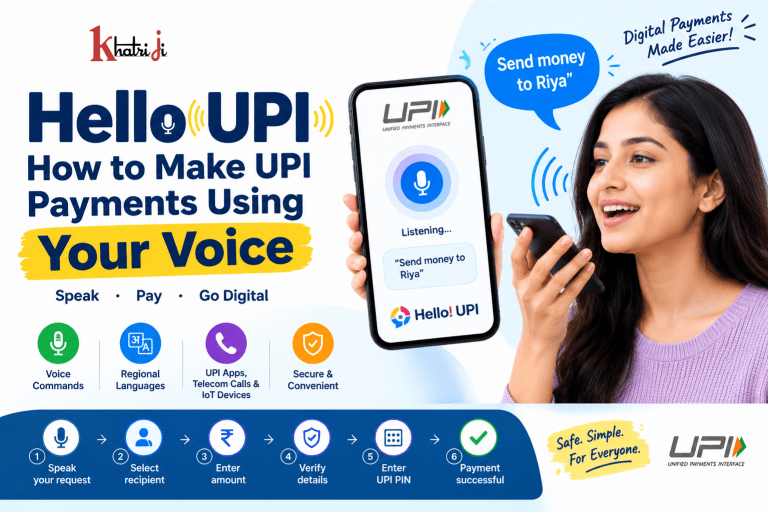
Imagine making a UPI payment without navigating through multiple screens, searching for a contact, or typing everything manually. You simply speak, follow the voice prompts, verify the payment details, and authorize the transaction.
That is the idea behind Hello! UPI, NPCI’s conversational payment initiative that enables users to interact with UPI using voice. NPCI says Hello! UPI is designed to make UPI easier to use through regional Indian languages and can be enabled through UPI apps, telecom calls, and IoT devices.
In this guide, we will explain what Hello UPI is, how voice-based UPI payments work, who can benefit from it, its advantages, limitations, and important safety precautions.
What Is Hello UPI?
Hello! UPI is a conversational, voice-enabled payment experience developed as part of NPCI’s UPI ecosystem.
Instead of relying entirely on touch-based navigation, users can interact with a compatible UPI service using spoken commands. NPCI describes Hello! UPI as a way to navigate UPI apps in regional Indian languages using voice and also supports conversational payments through telecom calls.
The initiative was introduced to make digital payments more accessible, particularly for people who may find traditional smartphone interfaces difficult.
NPCI specifically highlights potential benefits for:
- Senior citizens
- Digitally inexperienced users
- People more comfortable speaking their regional language
- Visually impaired users
- Users of feature phones
- People who prefer voice-based interaction
How Does Voice Payment With Hello UPI Work?
The basic concept is simple:
Speak → Select/Confirm → Verify → Enter UPI PIN → Payment Completed
Hello UPI uses conversational technology to understand what the user wants to do.
For example, a user may want to send money to another person. Instead of manually navigating through every option, the conversational interface can guide the user through the payment process.
NPCI’s original announcement described the system as allowing users to give voice commands to initiate a UPI payment, followed by UPI PIN authentication to complete the transaction.
A simplified flow
- Open a compatible Hello UPI-enabled UPI service.
- Activate the voice/conversational payment feature.
- Select or speak the required action.
- Provide the recipient’s details as requested.
- Enter or confirm the amount.
- Carefully check the payment details.
- Authorize the transaction using your UPI PIN.
- Check the transaction confirmation.
Important: The exact screens, commands, supported languages, and payment flow can vary depending on the UPI app or service implementing Hello UPI.
How to Use Hello UPI for Voice Payments
The availability and exact implementation of Hello UPI can differ between participating services. Therefore, users should follow the instructions displayed by their compatible UPI app or voice service.
Step 1: Use a compatible UPI service
First, make sure the UPI app or service you are using supports the Hello UPI/conversational payment functionality.
Hello UPI is an additional experience built on top of existing UPI functionality rather than a replacement for UPI itself. NPCI states that existing UPI app functionality continues to remain available.
Step 2: Activate the voice feature
Look for the voice, conversational payment, or Hello UPI option within the supported service.
Some implementations may use a voice prompt to start the interaction.
NPCI’s Hello UPI brand guidelines specify that participating implementations should begin the wake-up prompt with “Hello! UPI” followed by the relevant command or query.
Step 3: Speak your request
Once activated, speak clearly and naturally.
For example, depending on what the supported service allows, you may request an action such as sending money or navigating to a UPI function.
The system interprets the spoken request and guides you through the next steps.
Step 4: Provide payment details
The system may ask you for information such as:
- Recipient
- UPI ID or other supported identifier
- Payment amount
- Payment purpose or other required information
Always listen carefully before confirming.
Step 5: Verify the payment information
Before authorizing the payment, check:
- Recipient’s name
- UPI ID or account information shown
- Amount
- Bank account being used
- Any other transaction information displayed by the app
This is one of the most important steps in any UPI transaction.
Step 6: Enter your UPI PIN
Voice interaction does not mean that your UPI PIN should be spoken aloud.
NPCI states that UPI PIN authentication remains part of UPI payments. Its Hello UPI documentation also notes that existing UPI functionality, including UPI PIN entry through the common library, remains applicable.
Enter your UPI PIN using the secure authentication interface provided by the UPI service.
Step 7: Check the transaction status
After authorization, check the payment status in the app or through the confirmation provided by the service.
NPCI explains that UPI transactions provide transaction status and that users should check the confirmation after completing a payment.
Is Hello UPI the Same as UPI 123Pay?
No. They are related but not exactly the same.
Both are designed to make digital payments more accessible through voice and alternative interfaces, but they address different use cases.
Hello UPI
Hello UPI focuses on conversational payments, allowing users to interact with UPI using voice through supported UPI apps, telecom calls, and IoT devices.
UPI 123Pay
UPI 123Pay was designed specifically to make UPI accessible to feature-phone users and people with limited or no internet connectivity.
NPCI’s documentation describes channels including:
- IVR/phone network
- SIM-based functionality
- Proximity sound-based payments
- Missed-call-based payments
It supports use cases such as person-to-person payments, merchant payments, bill payments, mobile recharge and loan repayment.
So, while both improve accessibility, Hello UPI is primarily about conversational interaction, whereas UPI 123Pay is a broader feature-phone/low-connectivity payment solution.
Can Hello UPI Be Used on a Feature Phone?
Potentially, yes, depending on the implementation.
NPCI says Hello UPI can be enabled through telecom calls, UPI apps and IoT devices.
Government information has also described Hello UPI as supporting conversational UPI transactions through feature phones and smartphones.
However, you should not assume that every feature phone or every bank supports every Hello UPI functionality.
Availability depends on the participating service, bank, device and implementation.
Which Languages Does Hello UPI Support?
Hello UPI was introduced with support for Hindi and English, with the broader goal of making digital payments available through Indian regional languages. NPCI says the service is designed to facilitate payments in regional Indian languages and expand accessibility for people who are more comfortable communicating in their mother tongue.
The exact languages available to you may depend on the particular UPI app or service.
Therefore, always check the language options shown by your supported implementation.
What Are the Benefits of Hello UPI?
1. Easier payment navigation
Traditional UPI payments often require users to navigate several buttons and menus.
Voice interaction can make this process more natural.
2. Regional-language accessibility
Users can potentially interact with UPI in languages they are more comfortable speaking.
This can be especially useful in a multilingual country like India.
3. Helpful for senior citizens
Older users who find complex smartphone interfaces difficult may find conversational interaction easier.
NPCI specifically identifies senior citizens as one of the groups that can benefit from Hello UPI.
4. Better accessibility
Voice-based interaction can reduce dependence on visual navigation and may help users with visual impairments.
5. Useful for digitally inexperienced users
People who are unfamiliar with smartphone payment interfaces may find speaking a request more intuitive than navigating menus.
6. Supports multiple device environments
NPCI says Hello UPI can be enabled through UPI apps, telecom calls and IoT devices.
Is Hello UPI Safe?
Hello UPI operates within the UPI payment ecosystem, but voice convenience does not eliminate the need for transaction verification.
UPI continues to use authentication mechanisms such as the UPI PIN. NPCI states that users must not share their UPI PIN and that bank customer support will never ask for it.
The safest approach is:
Use voice for convenience, but use secure authentication for authorization.
Before approving any transaction, always verify the recipient and amount.
Important Hello UPI Safety Tips
Never Share Your UPI PIN
Your UPI PIN is confidential.
Do not tell it to:
- Friends
- Family members
- Shopkeepers
- Callers
- Customer-care representatives
- Anyone claiming to be from your bank
NPCI explicitly advises users not to share their UPI PIN.
Do Not Speak Your UPI PIN
A voice payment feature does not mean that you should say your UPI PIN aloud.
Use the secure PIN-entry interface provided by the UPI app or service.
Check the Recipient
Voice recognition can sometimes misunderstand speech, particularly with names, accents or background noise.
Always check the recipient shown on the confirmation screen.
Check the Amount
Before pressing or selecting the final authorization option, verify the amount.
A small misunderstanding in voice interaction can result in the wrong amount being entered.
Avoid Unknown Voice Calls
Do not make payments because someone calls you and asks you to “activate,” “verify,” or “receive” money through a voice-based UPI process.
If you are unsure, stop the transaction and contact your bank through its official customer-support channel.
Never Install Unknown Apps
Fraudsters may claim that a special app is required to activate voice payments.
Only use official applications and trusted payment services.
Hello UPI vs Traditional UPI Payment
| Feature | Traditional UPI | Hello UPI |
|---|---|---|
| Main interaction | Touch/screen | Voice/conversation |
| Payment authentication | UPI PIN | UPI PIN remains applicable |
| Navigation | Menus and buttons | Voice-assisted interaction |
| Language accessibility | Depends on app | Designed for regional-language voice interaction |
| Smartphone use | Yes | Supported implementations |
| Feature-phone use | Limited depending on service | Supported through certain implementations |
| Accessibility | Standard interface | More accessible for some users |
| Best for | Regular UPI users | Users who prefer voice interaction |
Hello UPI vs Phone Voice Assistant
It is also important to understand that Hello UPI is not simply Google Assistant, Siri, Alexa or another general-purpose voice assistant.
Hello UPI is specifically designed around UPI’s payment ecosystem and conversational payment experience.
The goal is to allow voice interaction with payment functions while retaining the authentication and security mechanisms required for UPI transactions. NPCI describes the technology as a conversational payment solution using voice recognition and natural-language processing.
What Happens If Hello UPI Does Not Understand You?
Voice systems may occasionally misunderstand a request because of:
- Background noise
- Poor microphone quality
- Strong accents
- Unclear pronunciation
- Similar-sounding names
- Network problems
- Unsupported commands
- Unsupported language
If this happens:
- Speak slowly and clearly.
- Move to a quieter location.
- Repeat the command.
- Check the information displayed on screen.
- Use the normal UPI interface if necessary.
Remember: never approve a transaction that you have not verified.
What If a Voice Payment Fails?
If a transaction fails, first check the transaction status in your UPI app.
Do not immediately repeat the payment if you are unsure whether the first transaction succeeded.
Check:
- Transaction history
- Bank SMS
- Available account balance
- UPI transaction status
If money has been debited but the transaction does not show the expected result, contact your bank or use the complaint mechanism provided by your UPI service.
NPCI says UPI apps provide mechanisms for raising complaints on transactions, while its FAQ advises contacting the bank if transaction confirmation is not received within the applicable period.
Who Should Use Hello UPI?
Hello UPI can be particularly useful for:
Senior citizens
People who find smartphone menus difficult may prefer speaking naturally.
First-time digital payment users
Voice interaction can make the learning curve easier.
Regional-language users
Users may find it easier to communicate in their preferred Indian language.
Visually impaired users
Voice-based navigation can reduce dependence on visual interfaces.
Feature-phone users
Certain Hello UPI implementations can extend conversational payment experiences through telecom calls.
Users who prefer hands-free interaction
Voice can provide an alternative to extensive touch-based navigation.
Does Hello UPI Replace Normal UPI?
No.
Hello UPI is an additional conversational interface for interacting with UPI.
NPCI specifically describes the Hello UPI experience as an additional process within UPI apps, while existing UPI functionality remains available.
That means users can continue using familiar methods such as:
- Scan & Pay
- UPI ID
- Mobile number
- Bank account details
- Payment requests
- Other supported UPI features
Why Voice Payments Could Be Important for India’s Digital Economy
India’s UPI ecosystem has grown dramatically over the past decade.
According to the Government of India, UPI had 55.49 crore users onboarded as of June 2026, while UPI processed more than 24,162 crore transactions during FY 2025–26, with transaction value of around ₹314 lakh crore.
As digital payments reach more people, accessibility becomes increasingly important.
Not every user interacts with technology in the same way.
Some users prefer typing.
Some prefer QR codes.
Some prefer buttons.
And some may find speaking naturally much easier.
This is where conversational payment technologies such as Hello UPI can play an important role.
Frequently Asked Questions About Hello UPI
What is Hello UPI?
Hello UPI is NPCI’s conversational payment initiative that allows users to interact with UPI using voice through supported implementations. It is designed to make UPI easier and more accessible through voice and regional languages.
Can I make UPI payments using my voice?
Yes, Hello UPI is designed to enable voice-based/conversational UPI payments through supported UPI apps, telecom calls and other supported environments.
Do I need to tell my UPI PIN to the voice assistant?
No. Never share your UPI PIN verbally.
Use the secure authentication interface provided by the UPI service. NPCI says the UPI PIN should not be shared with anyone.
Is Hello UPI available on every UPI app?
No. Availability depends on the specific app, bank and implementation. Hello UPI is an additional functionality that participating UPI services can enable.
Can feature-phone users use voice-based UPI?
Certain voice-based implementations support feature-phone users, including services operating through telecom calls. UPI 123Pay also specifically supports feature-phone users through multiple channels.
Is Hello UPI available in Hindi?
Hindi was one of the languages supported in the initial conversational UPI implementation, along with English. The broader Hello UPI initiative is designed to support regional-language accessibility.
Is Hello UPI the same as UPI 123Pay?
No. Hello UPI focuses on conversational/voice interaction, while UPI 123Pay is designed especially for feature-phone and low-connectivity use cases.
What should I do if voice recognition selects the wrong person?
Do not authorize the payment. Stop and verify the recipient details. You can correct the information or switch to the normal UPI interface.
Can I use Hello UPI without a UPI PIN?
The voice interface does not remove UPI authentication requirements. NPCI states that existing UPI functionality, including UPI PIN entry, remains applicable.
Final Thoughts
Hello UPI is an important step toward making digital payments more conversational and accessible.
Instead of requiring every user to understand complex menus and buttons, voice interaction allows people to communicate with payment services in a more natural way.
Its biggest potential advantages are accessibility, regional-language interaction and easier navigation for users who may struggle with traditional smartphone interfaces.
However, convenience should never replace security.
Before every payment:
Check the recipient → Check the amount → Authorize securely → Check the transaction status.
And remember: Your UPI PIN is private. Never share it with anyone.
For more digital payment guides, you can also explore the Khatriji App.
Tags: Digital India, digital payments, Hello UPI, NPCI, online payment, Payment Safety, UPI, UPI 123Pay, UPI Voice Payment, Voice Payment