
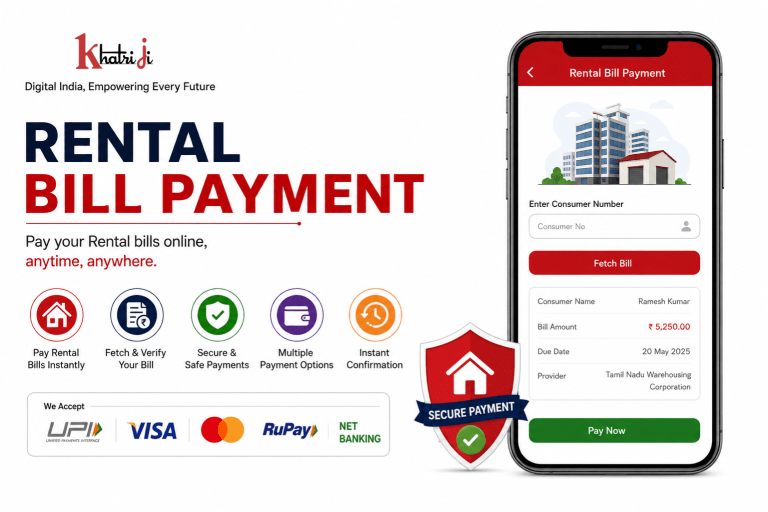
Paying rental bills online has become a convenient way to manage recurring payment obligations without visiting a physical office or payment counter. With digital bill-payment services, customers can enter their consumer details, verify the amount and complete an online payment from wherever they are.
Khatriji provides digital bill-payment services, including supported Rental billers. One currently indexed Khatriji Rental service is Tamil Nadu Warehousing Corporation, where customers can enter their Consumer No, fetch bill details and proceed with payment.
In this guide, we explain how to pay Rental bills online with Khatriji, what details you may need, how the payment process works and what you should check after completing the transaction.
What Is Rental Bill Payment?
Rental bill payment is the process of paying an amount due to a supported rental service provider through an online payment platform.
Depending on the provider, you may need to enter information such as:
- Consumer Number
- Account Number
- Customer ID
- Registered details
- Bill or rental amount
The exact information required can vary from one rental provider to another.
For example, Khatriji’s Tamil Nadu Warehousing Corporation Rental page asks customers to enter their Consumer No and provides an option to fetch the bill before payment.
Why Pay Rental Bills Online?
Online rental bill payment can make regular payments more convenient.
1. Convenient Payment
You can make a supported rental payment online without having to visit a payment counter.
2. Saves Time
Digital payment can reduce the need for manual paperwork and physical queues.
3. Bill Verification
Where bill-fetch functionality is available, you can verify the bill details before proceeding.
4. Digital Transaction Record
A successful transaction provides payment details that can be useful for future reference.
5. Easy Access
You can access supported bill-payment services online whenever the service is available.
How to Pay Rental Bills Online with Khatriji
The exact process may vary depending on the rental provider, but the general process is simple.
Step 1: Visit Khatriji
Download the Khatriji app or open the website according to your device:
- Android App: Click here to download the Khatriji app.
- Ios App (Apple): Click here to download the Khatriji app.
- Website: Click here to open the Khatriji website.
Step 2: Select Rental
Go to the applicable bill-payment category and select Rental.
Step 3: Select Your Provider
Choose the supported rental provider for which you want to make the payment.
For example, Khatriji currently has a dedicated page for Tamil Nadu Warehousing Corporation Rental Payment.
Step 4: Enter Consumer Details
Enter the required customer information.
For the Tamil Nadu Warehousing Corporation service, the Khatriji page asks for the Consumer No.
Step 5: Fetch and Verify the Bill
If bill-fetch functionality is available, fetch the bill and carefully check the displayed information.
Verify:
- Consumer details
- Provider name
- Bill amount
- Due information
- Other displayed details
Step 6: Complete the Payment
Proceed with the available digital payment method and authorize the transaction.
Step 7: Save the Confirmation
After successful payment, save the transaction/reference number or payment confirmation for future reference.
What Details Are Required for Rental Bill Payment?
The information required depends on the rental provider.
You may need:
- Consumer Number
- Customer ID
- Account Number
- Registered mobile number
- Bill details
- Payment amount
Always enter the information exactly as provided by your rental service provider.
Rental Bill Payment Through Khatriji
Khatriji’s Rental category includes supported rental billers. The currently indexed Tamil Nadu Warehousing Corporation page describes the service as a Rental payment service and provides a consumer-number based bill-fetch and payment process.
The basic process can be summarized as:
Select Provider → Enter Consumer Number → Fetch Bill → Verify Details → Make Payment → Receive Confirmation
This makes it easier to manage supported rental payments through a digital platform.
Benefits of Using Khatriji for Rental Payments
Easy Digital Payment
You can manage supported rental payments through an online payment process.
Bill Details Verification
Where supported, you can fetch bill details before making the payment.
Secure Transactions
Khatriji describes its bill-payment services as using secure payment infrastructure and encrypted transactions.
Multiple Digital Payment Options
Khatriji’s currently indexed rental provider page lists payment options including UPI, credit card, debit card and net banking.
Note: Payment options can vary depending on the service and current availability.
Payment Confirmation
After completing a successful payment, keep the transaction confirmation or reference number.
Rental Bill Payment vs Offline Payment
| Feature | Online Rental Payment | Offline Payment |
|---|---|---|
| Payment location | Online | Physical location |
| Physical visit | Usually not required | May be required |
| Bill verification | Available where supported | Depends on provider |
| Payment record | Digital | May be physical |
| Convenience | High | Depends on location |
| Payment method | Available digital methods | Cash/card/other methods depending on provider |
Things to Check Before Paying a Rental Bill
Before confirming your payment, always check the following.
1. Verify the Provider
Make sure you have selected the correct rental service provider.
2. Check Your Consumer Number
Enter the correct Consumer Number or account information.
3. Verify the Bill Amount
If bill details are fetched, carefully check the amount before proceeding.
4. Check Payment Details
Make sure the amount shown on the payment page is correct.
5. Save the Transaction ID
Keep your transaction/reference number after payment.
What If the Rental Bill Payment Is Pending?
Sometimes a digital transaction may not immediately show a final status.
If your payment is pending:
- Do not immediately make another payment.
- Check your transaction status.
- Check whether the amount has been debited.
- Keep your transaction/reference number.
- Allow the applicable processing time.
- Contact the relevant support channel if the issue continues.
Avoid making duplicate payments before checking the status of the original transaction.
What If Money Is Debited but the Rental Bill Is Not Updated?
If your payment amount has been debited but the rental account has not been updated:
- Keep the transaction ID ready.
- Check the payment status.
- Verify your Consumer Number.
- Check the payment confirmation.
- Allow the applicable processing time.
- Contact support if the payment remains unresolved.
Your transaction reference can be particularly useful when investigating a payment issue.
Is Online Rental Bill Payment Safe?
Online payment can be convenient when you use a legitimate payment platform and follow basic security practices.
For safer digital payments:
- Never share your OTP.
- Never share your UPI PIN.
- Never share your card PIN.
- Verify the provider before payment.
- Check the Consumer Number.
- Check the payment amount.
- Use the official Khatriji website.
- Keep your transaction confirmation.
Khatriji’s rental provider page states that payments are protected through secure payment gateways and encryption.
Does Khatriji Support All Rental Providers?
No platform should be assumed to support every rental provider.
Khatriji provides supported billers, and availability can change over time.
For example, the currently indexed Khatriji Rental service includes Tamil Nadu Warehousing Corporation.
Therefore, always search the Rental category on Khatriji and confirm that your specific provider is available before starting the payment.
How to Find Your Rental Provider on Khatriji
You can follow these steps:
- Visit Khatriji.
- Open the bill-payment services.
- Select Rental.
- Search for your provider.
- Select the applicable provider.
- Enter the requested customer details.
- Fetch the bill where available.
- Verify the details.
- Complete the payment.
If your provider is not listed, do not select another provider simply because its name appears similar.
Example: Tamil Nadu Warehousing Corporation Rental Payment
Khatriji currently provides a dedicated Rental payment page for Tamil Nadu Warehousing Corporation.
The page allows customers to:
- Select the provider.
- Enter their Consumer No.
- Fetch bill details.
- Verify the amount.
- Complete the payment.
You can access the confirmed provider page here:
Tamil Nadu Warehousing Corporation Rental Payment on Khatriji
Why Choose Digital Rental Bill Payment?
Digital payments can be useful for customers who want a convenient way to manage recurring financial obligations.
With supported online rental services, you can:
- Pay from anywhere
- Avoid unnecessary physical visits
- Verify bill information where available
- Use available digital payment methods
- Keep a digital transaction reference
- Manage payments more conveniently
Frequently Asked Questions
What is Rental Bill Payment?
Rental Bill Payment is the online payment of a rental-related bill or amount owed to a supported service provider.
Can I pay Rental bills online with Khatriji?
Yes, Khatriji provides online payment for supported Rental billers. One currently indexed example is Tamil Nadu Warehousing Corporation.
What details are required?
The required details depend on the provider. A Consumer Number, Customer ID or Account Number may be required.
Can I check my Rental bill before payment?
Where bill-fetch functionality is available, you can fetch and verify your bill before completing the payment.
What payment methods are available?
Available payment methods depend on the service. Khatriji’s currently indexed Tamil Nadu Warehousing Corporation page lists UPI, credit card, debit card and net banking.
What should I do after making the payment?
Save your payment confirmation and transaction/reference number for future reference.
What if my payment is pending?
Check the transaction status and whether the amount has been debited. Avoid making a duplicate payment until the original transaction status is clear.
Does Khatriji charge a fee for every Rental payment?
Charges, if any, can depend on the service and current applicable terms. Check the final payment screen before confirming the transaction.
Is Khatriji a Rental service provider?
Khatriji functions as a digital recharge and bill-payment platform. Rental payments are available for supported billers; the underlying rental service remains with the relevant provider.
Conclusion
Paying supported Rental bills online can make regular payments easier, faster and more convenient.
With Khatriji, customers can access supported Rental bill-payment services, enter their consumer details, verify bill information where available and complete the payment digitally.
For example, Khatriji currently has a dedicated Tamil Nadu Warehousing Corporation Rental Payment service where customers can enter their Consumer Number, fetch bill details and proceed with payment.
Before every payment, make sure you select the correct provider, enter the correct Consumer Number, verify the bill amount, and save your transaction reference after successful payment.
Tags: Bill Payment India, digital payments, Digital Rental Payment, khatriji, Khatriji Rental Bill Payment, Khatriji Rental Service, online bill payment, Online Rental Payment India, Pay Rental Bill Online, Rental Bill Payment, Rental Bill Payment India, Rental Bill Payment Online, Rental Payment Online, Rental Services, Rental Services Payment