
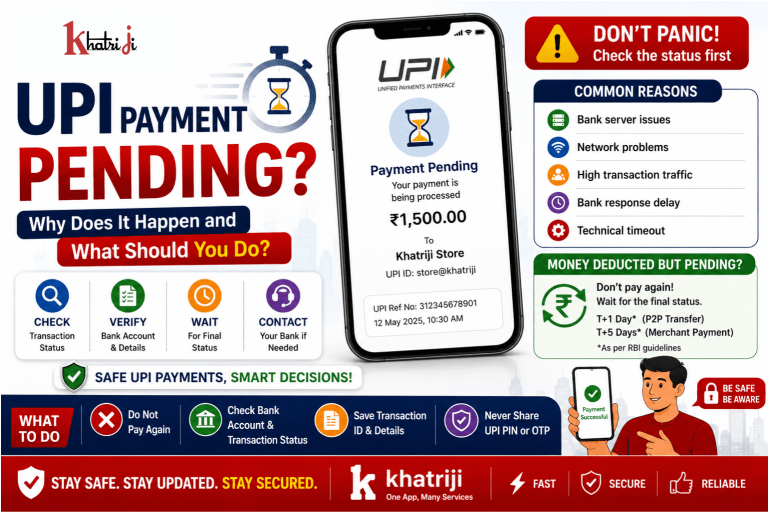
Imagine this: You scan a UPI QR code, enter the amount, enter your UPI PIN, and wait for the confirmation.
But instead of “Payment Successful”, you see:
“Payment Pending.”
At this point, many people immediately worry:
- Has my money been deducted?
- Will the merchant receive the money?
- Should I make the payment again?
- Will I get my money back?
- How long should I wait?
A pending UPI payment can be confusing, especially when the amount has already been debited from your bank account.
The good news is that a pending transaction does not automatically mean that your money is lost. The transaction may still be processing, and its final status can change to successful or failed.
In this guide, we explain what a pending UPI payment means, why it happens, what you should do, when you should contact your bank, and how to avoid making the situation worse.
What Does “UPI Payment Pending” Mean?
A UPI payment pending status generally means that the transaction has not yet reached a final status.
The payment instruction has been initiated, but confirmation of the final outcome has not yet been received.
The transaction could eventually become:
- Successful
- Failed
- Reversed/refunded, depending on the circumstances
This is different from a transaction that is already clearly marked Failed.
Therefore, if your UPI payment says Pending, you should avoid immediately making another payment for the same purchase.
Why Does a UPI Payment Become Pending?
There can be several reasons why a UPI transaction remains pending.
1. Bank Server Issues
Sometimes your bank or the receiver’s bank may experience temporary technical problems.
If the banking system is slow or unavailable, the transaction may not receive an immediate final confirmation.
2. Temporary Network Problems
UPI transactions involve communication between multiple systems.
A temporary interruption in internet connectivity or communication between participating systems can prevent the transaction status from being updated immediately.
3. Bank Response Delay
Your UPI app may have successfully sent the payment request, but the final response from the bank may take longer than expected.
This can result in a pending status.
4. High Transaction Traffic
During periods of heavy usage, payment systems can experience increased transaction traffic.
For example, payment activity may be particularly high during:
- Festivals
- Shopping events
- Salary dates
- Bill-payment deadlines
- Major online sales
- Peak business hours
A temporary delay can sometimes cause transactions to remain pending.
5. Merchant Confirmation Delay
For merchant payments, the payment may have been initiated successfully but the merchant-side system may not immediately receive or display confirmation.
This can create uncertainty for both the customer and merchant.
6. Technical Timeout
A transaction may experience a timeout while different systems are communicating.
The UPI app may therefore temporarily show the transaction as pending until the final status becomes available.
What Should You Do If Your UPI Payment Is Pending?
If your UPI transaction shows Pending, follow these steps.
Step 1: Don’t Panic
First, don’t assume that the money is gone.
A pending status means the transaction has not received a final status yet.
Step 2: Check Your Bank Account
Open your bank account or banking app and check whether the amount has been debited.
There are two common situations.
Situation A: Money Was Not Debited
If your account was not debited, wait for the transaction status to update before trying again.
Situation B: Money Was Debited
If money has been debited but the payment remains pending, don’t immediately make another payment.
The original transaction may still be processed.
Step 3: Check the UPI Transaction Details
Open your UPI application and go to:
Transaction History → Select the Pending Transaction
Check:
- Transaction status
- Amount
- Date and time
- Recipient/merchant name
- Transaction ID/UPI reference number
Keep the transaction ID safe if you need to contact your bank or payment provider.
Step 4: Refresh the Transaction Status
Use the refresh or status-check option available in your UPI application.
NPCI’s UPI Help guidance specifically notes that refreshing a pending transaction can help obtain its current status.
The status may eventually change to:
Successful
or
Failed
or another final status depending on the transaction outcome.
Step 5: Ask the Merchant to Check
If you were paying a shop, restaurant, travel provider or online merchant, ask them whether they received the payment.
However, don’t rely only on the merchant’s screen.
Your own UPI transaction history and bank account should also be checked.
Step 6: Don’t Make the Same Payment Again Immediately
This is one of the most important precautions.
Suppose you were paying ₹2,000.
Your first transaction shows pending.
If you immediately pay another ₹2,000, the first transaction could later become successful.
You could then end up paying:
₹2,000 + ₹2,000 = ₹4,000
Instead of paying twice, first determine the status of the original transaction.
What If Money Is Deducted but the Merchant Hasn’t Received It?
This is one of the most common concerns.
For example:
Payment Amount: ₹1,500
Your Bank: Amount Debited
Merchant: Payment Not Received
UPI App: Pending
In this situation, don’t immediately make another payment.
The transaction may still be processing.
If the transaction ultimately fails and the beneficiary/merchant is not credited, RBI’s framework provides specific timelines for auto-reversal of failed UPI transactions.
For a UPI fund transfer where the customer’s account is debited but the beneficiary account is not credited, the transaction is to be auto-reversed by the beneficiary bank by T+1 day if it cannot be completed. RBI’s framework also provides ₹100 per day compensation for delay beyond that prescribed timeline.
For a merchant transaction where the customer’s account is debited but confirmation is not received at the merchant location, the prescribed auto-reversal timeline is T+5 days, with ₹100 per day compensation for delay beyond that timeline under the RBI framework.
Here, T means the calendar date of the transaction.
What Is T+1 and T+5?
These terms can sound confusing.
T
T = Date of the transaction
For example, if a transaction happens on Monday:
T = Monday
T+1
This means the next calendar day:
T+1 = Tuesday
T+5
This means five calendar days after the transaction date.
The applicable timeline depends on the type of failed UPI transaction.
What If the Transaction Changes From Pending to Failed?
If your UPI payment changes from Pending to Failed, check your bank account.
If the amount was not debited, there may be nothing further you need to do.
If the amount was debited, the applicable reversal process should be followed.
NPCI’s UPI Help guidance states that in case of a wrong debit, the amount is to be credited back and users can raise the concern through UPI Help.
What If the Transaction Becomes Successful Later?
This is why you should be careful about making a second payment.
Suppose:
10:00 AM: You make a ₹1,000 UPI payment.
10:01 AM: Status shows Pending.
10:05 AM: You make another ₹1,000 payment.
10:08 AM: First transaction becomes Successful.
Now you may have paid:
₹2,000 instead of ₹1,000.
Always check the original transaction before retrying.
How Long Should You Wait for a Pending UPI Payment?
There is no single universal waiting time for every pending transaction.
The final resolution depends on:
- Transaction type
- Bank involved
- Merchant/payment system
- Whether the beneficiary was credited
- Whether the transaction ultimately fails
- Applicable RBI/NPCI rules
For failed transactions covered by RBI’s framework, specific outer timelines apply for auto-reversal.
Therefore, instead of repeatedly attempting the payment, monitor the transaction status and follow the applicable complaint process if it does not resolve within the prescribed timeline.
When Should You Contact Your Bank?
You should consider contacting your bank/payment provider when:
- Money was debited but the transaction does not resolve
- The beneficiary has not received the money
- The merchant says payment was not received
- The transaction has failed but the amount has not been reversed within the applicable timeline
- Your transaction history contains inconsistent information
- You suspect an unauthorized transaction
Keep these details ready:
- Transaction ID
- UPI reference number
- Amount
- Date and time
- Recipient/merchant name
- Screenshot of the transaction status
- Bank statement/debit information
Should You Contact NPCI Directly?
For an individual transaction issue, your first point of contact should generally be the bank/payment service provider through which the transaction was initiated, following the available complaint mechanism.
NPCI guidance indicates that customers can raise complaints through the applicable UPI complaint mechanism, while member banks are responsible for addressing customer complaints relating to UPI transactions.
If the issue is not resolved through the relevant regulated entity’s grievance process, customers can use the applicable RBI grievance-redressal mechanism.
What Is UPI Help?
NPCI introduced UPI Help as a digital dispute-resolution and transaction-support mechanism.
It was designed to help users:
- Check pending transaction status
- Raise complaints
- Report transactions that were not processed
- Report situations where money was not credited to the beneficiary
- Raise merchant transaction complaints
NPCI has described UPI Help as a mechanism intended to make digital-payment issue resolution easier for customers.
Availability and exact functionality can depend on the participating bank or application.
What Information Should You Save?
Whenever you make an important UPI payment, especially a large payment, keep a record of:
Transaction ID
The UPI transaction/reference number can help the bank identify the transaction.
Amount
Record the exact amount.
Date and Time
This helps with transaction investigation.
Recipient Name
Verify and keep the recipient/merchant information.
Screenshot
A screenshot of the transaction status can be useful if you need to raise a complaint.
Common Mistakes to Avoid
Mistake 1: Paying Again Immediately
Don’t make another payment simply because the first one shows pending.
Mistake 2: Closing the App and Ignoring the Transaction
Always check the transaction history and final status.
Mistake 3: Trusting a Random Caller
Someone may call claiming:
“Your UPI payment is stuck. Tell me your OTP or UPI PIN.”
Don’t share it.
Mistake 4: Sharing Your UPI PIN
Your UPI PIN should remain confidential.
No legitimate support person should need your UPI PIN to check a transaction.
Mistake 5: Installing Unknown Apps
Fraudsters may ask users to install screen-sharing or remote-access applications to “fix” a payment.
Avoid installing unknown applications based on unsolicited instructions.
UPI Pending Payment vs Failed Payment
Understanding the difference is important.
| Status | Meaning |
|---|---|
| Pending | Final transaction status has not yet been received |
| Successful | Payment completed successfully |
| Failed | Transaction could not be completed |
| Reversed/Refunded | Amount returned after an unsuccessful transaction, where applicable |
The exact labels can vary between payment applications.
What If a Merchant Says “Payment Failed” but Your App Says “Pending”?
Don’t immediately pay again.
First:
- Check your UPI transaction history.
- Check your bank account.
- Note the transaction ID.
- Ask the merchant to verify whether payment was received.
- Wait for the original transaction to receive a final status.
- Make another payment only after you are reasonably certain the first transaction did not succeed.
This can help prevent duplicate payments.
What If the Merchant Received the Money but Your App Shows Pending?
If the merchant confirms receiving the payment, don’t send another payment.
Keep your transaction reference number and allow the payment status to update.
If the status remains inconsistent, contact your bank/payment provider with the transaction details.
What If You Accidentally Paid Twice?
If you made a second payment and later discover that both transactions were successful:
Step 1
Save both transaction IDs.
Step 2
Contact the merchant and explain the duplicate payment.
Step 3
Ask whether the extra payment can be refunded.
Step 4
If necessary, raise a complaint through your UPI app/bank’s available dispute mechanism.
Don’t delete transaction records or screenshots.
How to Avoid UPI Payment Problems
You can reduce the chances of payment issues by following a few simple practices.
1. Keep Your UPI App Updated
Use the latest official version of your payment application.
2. Maintain a Stable Internet Connection
Avoid making important payments when your network is unstable.
3. Verify the Recipient
Before entering your UPI PIN, check the recipient’s name and payment amount.
4. Don’t Rush
If a transaction is pending, give it time to receive a final status.
5. Keep Your Bank App Accessible
Your banking app can help you confirm whether an amount has actually been debited.
6. Keep Transaction References
Save important transaction IDs, especially for high-value payments.
UPI Payment Security Tips
UPI is designed for secure digital payments, but users must also protect themselves.
Never Share Your UPI PIN
Your UPI PIN is private.
Never Share OTPs
Do not share OTPs with callers or unknown individuals.
Verify QR Codes
Before paying, check the recipient name shown by your UPI application.
Don’t Approve Unknown Collect Requests
Never approve a payment request simply because someone tells you that it is required to receive money.
Be Careful With Refunds
Be suspicious if someone asks you to enter your UPI PIN to receive a refund.
Don’t Trust Fake Customer Care
Always find support details through your bank or payment application’s official channels.
Does a Pending UPI Payment Mean the Money Is Lost?
No.
A pending status does not by itself mean that the money has been permanently lost.
The transaction may still be processed or may eventually fail and be reversed according to the applicable process.
The important thing is to:
Check → Wait for the final status → Avoid duplicate payment → Raise a complaint if required.
What You Should Do: Quick Checklist
If your UPI payment is pending, follow this checklist:
✓ Check transaction history
✓ Check whether your bank account was debited
✓ Verify the recipient/merchant
✓ Refresh the transaction status
✓ Save the transaction ID
✓ Don’t make another payment immediately
✓ Wait for the transaction to reach a final status
✓ Contact your bank/payment provider if necessary
✓ Raise a complaint if the transaction does not resolve within the applicable timeline
✓ Never share your UPI PIN or OTP
Example: ₹5,000 UPI Payment Pending
Let’s understand with an example.
You purchase a product for:
₹5,000
You scan the merchant’s QR code and complete the payment.
Your app shows:
Payment Pending
Your bank account shows:
₹5,000 Debited
The merchant says:
Payment Not Received
What should you do?
Don’t pay another ₹5,000 immediately.
Instead:
1. Open transaction history.
2. Note the UPI transaction ID.
3. Check whether the transaction remains pending.
4. Ask the merchant to check their payment records.
5. Monitor your bank account.
6. Wait for the final transaction status.
7. If the transaction ultimately fails and the amount is not reversed within the applicable prescribed timeline, contact your bank/payment provider and raise a complaint.
This approach reduces the risk of accidentally paying twice.
Why Patience Is Important With Pending Transactions
UPI is designed for fast payments, but a digital transaction involves multiple participants and systems.
A typical transaction can involve:
Customer → UPI App → PSP/Bank → NPCI Infrastructure → Beneficiary Bank → Merchant
If one part of the process experiences a temporary delay, the final confirmation may also be delayed.
That is why a payment can sometimes remain pending even though you have already entered your UPI PIN.
The Future of UPI Payments
UPI has become an important part of India’s digital-payment ecosystem.
As digital payments continue to grow, transaction reliability, security, fraud prevention and faster dispute resolution will become increasingly important.
For customers, understanding transaction statuses is equally important.
Knowing the difference between:
Pending
Successful
Failed
and
Reversed
can help users make better decisions and avoid unnecessary duplicate payments.
Frequently Asked Questions
What does UPI payment pending mean?
It generally means that the transaction has not yet received a final status. It may later become successful, failed or be reversed depending on the outcome.
Can I make another payment if my UPI payment is pending?
It is better not to immediately make another payment. The original transaction may later become successful, which could result in a duplicate payment.
What if money is deducted but UPI payment is pending?
Check your transaction history and bank account, save the transaction ID and wait for the final status. If the transaction ultimately fails and the amount is not reversed within the applicable timeline, contact your bank/payment provider.
How long does a failed UPI transaction take to reverse?
The applicable RBI framework provides different timelines depending on the transaction type. For a UPI transfer where the beneficiary is not credited, the prescribed auto-reversal timeline can be T+1 day. For certain merchant transactions where confirmation is not received, the prescribed auto-reversal timeline can be T+5 days.
What is T+1 in UPI?
T means the transaction date. T+1 means the next calendar day.
What is T+5 in UPI?
T+5 means five calendar days after the transaction date.
Will I get compensation if a failed UPI transaction is not reversed on time?
Under the RBI framework for specified failed UPI transactions, compensation of ₹100 per day can apply for delays beyond the prescribed auto-reversal timeline. The exact applicability depends on the type of transaction and circumstances.
Should I share my UPI PIN with customer support?
No. Never share your UPI PIN with anyone.
Can a pending UPI payment become successful?
Yes. A pending transaction can receive a final successful status, which is why users should avoid immediately making another payment.
What should I do if the merchant says they haven’t received my payment?
Check your transaction status and bank account, save the transaction ID, ask the merchant to verify their records and avoid making another payment until the original transaction’s status is clear.
Where should I complain about a UPI transaction problem?
Start with the bank/payment provider and the complaint mechanism available through your UPI application. NPCI guidance indicates that participating banks are responsible for addressing customer complaints relating to UPI transactions.
Conclusion
A UPI Payment Pending message can be stressful, especially when money has already been deducted from your bank account.
However, a pending transaction does not automatically mean that your money is lost.
The most important thing is to avoid making a second payment before understanding what happened to the first transaction.
Remember the simple rule:
Check → Verify → Wait → Track → Complain if necessary
Check your UPI transaction history.
Verify whether your bank account was debited.
Keep the transaction ID.
Wait for the final status.
If the transaction fails and the amount is not reversed within the applicable timeline, contact your bank/payment provider and raise a complaint.
And most importantly:
Never share your UPI PIN, OTP or banking credentials with anyone.
Digital payments are designed to make everyday transactions easier. A little patience and awareness can help you avoid duplicate payments, unnecessary worry and many common UPI-related problems.
Khatriji — One App, Many Services.
Tags: digital payments, Financial Awareness, khatriji, Online Payments, UPI, UPI Failed Payment, UPI Payment Pending, UPI Refund, UPI Security, UPI Transaction