
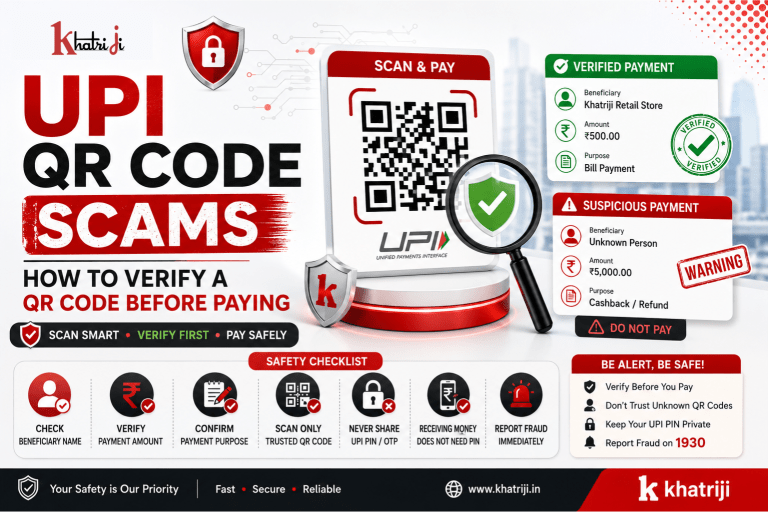
UPI has made digital payments fast and convenient. Today, customers can scan a QR code, verify the payment details and authorize a transaction within seconds. UPI supports QR-based payments as one of its payment methods.
However, the convenience of UPI QR Code Payment also means that users need to be careful before scanning and approving a transaction. Fraudsters can use fake QR codes, misleading payment requests, fake cashback offers, impersonation and social-engineering techniques to trick users into sending money.
The good news is that a few simple checks can significantly reduce the risk of making a payment to the wrong person.
In this guide, we explain how to identify a suspicious UPI QR code, what to verify before entering your UPI PIN, common QR Code scams, and what to do if you accidentally make a fraudulent payment.
What Is a UPI QR Code?
A UPI QR code is a scannable code that can be used to initiate a UPI payment.
When you scan a merchant’s QR code using a supported UPI application, the payment screen can display information about the transaction and beneficiary. NPCI’s UPI framework supports QR-based payments, while its guidelines require UPI payment interfaces to clearly support the Scan & Pay flow.
Depending on the QR code and payment flow, you may see:
- Beneficiary or merchant name
- UPI ID or related payment details
- Amount
- Transaction information
Most importantly, scanning a QR code does not mean you should immediately authorize the payment.
Instead, review the payment screen carefully. Then verify the recipient and amount before entering your UPI PIN.
Are UPI QR Codes Safe?
UPI is designed with authentication and security mechanisms, including UPI PIN-based authorization for transactions.
But the technology itself cannot protect you from every form of social engineering.
For example, a scammer could convince you to:
- Scan a QR code
- Approve a payment request
- Enter your UPI PIN
- Send money to an incorrect beneficiary
- Believe that you are receiving a refund or cashback
NPCI specifically warns that fraudsters may send QR codes or links while promising rewards or cashback, and emphasizes that scanning a QR code and entering a UPI PIN is for making a payment, not for receiving money.
Therefore, the safest approach is:
Never trust a QR code simply because it looks professional. Verify the payment details before authorizing the transaction.
How to Verify a UPI QR Code Before Paying
Before making any UPI QR payment, follow these simple checks to reduce the risk of fraud.
1. Check the Beneficiary Name
This is one of the most important checks.
After scanning the QR code, carefully look at the name shown on the payment confirmation screen.
NPCI has instructed UPI apps to display the ultimate beneficiary’s banking name on the pre-transaction screen.
This helps users verify who will receive the payment. Therefore, don’t rely only on the name printed on a QR code or a name saved in your payment app.
Always check the beneficiary name before entering your UPI PIN.
If the name shown does not match the person or business you intend to pay:
Stop the transaction.
Do not enter your UPI PIN until the recipient identity is clear.
2. Check the Amount Before Entering Your UPI PIN
Never assume that the amount displayed on the payment screen is correct.
Before approving the transaction, check:
₹ Amount → Beneficiary Name → Payment Purpose
For example, you may be purchasing something for ₹500 while the payment screen shows ₹5,000. In that situation, stop the transaction immediately.
Likewise, if you expect to pay ₹2,000 but the displayed amount is blank or different, contact the recipient and verify the details first.
3. Never Scan a QR Code to “Receive Money”
This is one of the most important UPI safety rules.
For example, a scammer may tell you:
“Scan this QR code to receive your refund.”
Another common message is:
“Scan this QR code and enter your UPI PIN to receive cashback.”
Both requests should be treated as warning signs.
NPCI’s fraud-awareness guidance explains that scanning a QR code and entering a UPI PIN is meant for making a payment, not receiving money.
Remember:
Receiving money does not require you to enter your UPI PIN to authorize a payment to someone else.
If someone asks you to scan a QR code and enter your PIN to receive money, stop the process. Verify the request independently through an official channel.
4. Don’t Trust a QR Code Just Because It Is Printed at a Shop
However, a QR code displayed at a physical store is not automatically genuine.
Scammers can potentially place misleading stickers or QR codes over legitimate payment displays.
Before paying at a shop:
- Look at the merchant name.
- Check the payment screen after scanning.
- Confirm the amount.
- If necessary, ask the merchant to confirm the beneficiary name.
- Only then authorize the payment.
NPCI’s UPI guidelines also specify standardized UPI branding and merchant QR presentation requirements, including display of the merchant’s UPI ID in applicable QR designs.
5. Check the UPI ID or Payment Details
When available, compare the displayed UPI ID or payment information with the details provided by the legitimate merchant or recipient.
Be cautious when:
- The UPI ID looks unrelated to the business.
- The recipient name is unexpected.
- Someone suddenly changes the payment QR.
- A seller asks you to pay to a personal account without explanation.
- The QR code was received from an unknown person.
Therefore, if anything looks unusual, verify the payment through a trusted communication channel.
6. Don’t Pay Based on a Screenshot
A screenshot is not proof that a payment destination is legitimate.
For example, someone could send you:
- A screenshot of a QR code
- A payment confirmation screenshot
- A fake receipt
- An image showing a business name
Instead of relying on the screenshot, open your own UPI app. Scan the QR code only if you trust its source, and then verify the actual beneficiary and amount displayed by the app.
7. Be Careful With QR Codes Sent on WhatsApp or SMS
Unexpected QR codes deserve extra attention, especially when they arrive through:
- SMS
- Telegram
- Social media
- Unknown websites
Before scanning, ask yourself:
Why am I being asked to make this payment?
An unexpected request should never be treated as automatically genuine. Instead, verify the sender through a trusted communication channel before making any payment.
8. Beware of Fake Cashback Offers
In addition, fake cashback is a common social-engineering technique used to trick users.
A scammer may say:
“You have won ₹2,000 cashback.”
They may then send:
- A QR code
- A payment link
- A fake customer-care number
- A fake refund process
As a result, the objective may be to convince you to authorize a payment.
NPCI specifically lists fake cashback links among the fraud trends users should watch for.
Safety rule
Never pay money to receive cashback.
Verify promotional offers through the company’s official website or app.
9. Never Share Your UPI PIN
Your UPI PIN is used to authorize transactions.
NPCI states that users should not share their UPI PIN with anyone and that bank customer support will not ask for it.
Never share your:
- UPI PIN
- OTP
- ATM PIN
- Debit card details
- Internet banking password
- CVV
- Mobile banking credentials
with a caller, merchant, unknown person or supposed customer-care representative.
10. Don’t Let Someone Rush You
Finally, don’t allow anyone to pressure you into making a payment.
Scammers often create a false sense of urgency. Their goal is to make you act before you have time to check the payment details.
For example, they may say:
- “Pay within 2 minutes, or your transaction will fail.”
- “Your account could be blocked. Complete the verification now.”
- “Scan this QR code to receive your refund.”
- “Your refund expires today.”
- “Share the OTP to complete the verification.”
- “Complete the payment now to avoid booking cancellation.”
However, legitimate payment verification should not require you to ignore basic safety checks.
Before paying, take a moment to verify:
- Beneficiary name
- Payment amount
- Payment purpose
- Recipient details
If anything seems unusual, stop the transaction. Then verify the request through the company’s official website, app or a trusted contact.
Common UPI QR Scams
1. Fake Refund Scam
A scammer may claim that you are eligible for a refund and ask you to scan a QR code.
Red flag:
The person asks you to enter your UPI PIN to receive money.
What to do:
Do not authorize the payment. Instead, contact the company through its official channel.
2. Fake Cashback Scam
Some fraudsters promise cashback or rewards after you scan a QR code.
Red flag:
You are asked to pay money first or enter your UPI PIN.
What to do:
Verify the offer through the company’s official website or app.
3. Fake Customer Care Scam
In another common tactic, someone pretends to be customer support and sends you a QR code.
Red flags:
- Request for your UPI PIN
- Unknown WhatsApp number
- Request to install an unknown application
- Unsolicited phone call
- Request to scan a QR code
What to do:
End the conversation and contact the company’s official customer support yourself.
4. Fake Merchant QR Code
Fraudsters may place a fake QR code over or near a genuine merchant QR code.
Red flag:
The beneficiary name displayed after scanning does not match the merchant.
What to do:
Stop the payment and ask the merchant to verify the correct QR code.
UPI QR Code Red Flags
Be extra careful if you notice one or more of these signs:
🚩 Unexpected QR Code
You weren’t expecting a payment request.
🚩 Wrong Recipient Name
The name shown after scanning doesn’t match the intended recipient.
🚩 Wrong Amount
The payment amount is different from what you agreed upon.
🚩 Cashback Promise
You are told to scan a QR to receive money.
🚩 UPI PIN Request
Someone asks you to enter your PIN to receive a refund or reward.
🚩 Urgency
You are pressured to make the payment immediately.
🚩 Unknown Contact
The QR code comes from an unknown person or account.
🚩 Personal UPI ID
A supposed business asks you to send money to an unrelated personal account.
🚩 Unusual Payment Request
The transaction doesn’t match the purpose for which you are paying.
The 10-Second UPI QR Safety Check
Before pressing Pay, use this simple method:
STOP
Don’t rush.
CHECK
Check the:
Recipient + Amount + Purpose
VERIFY
Confirm that the beneficiary is the person or business you intended to pay.
AUTHORIZE
Only then enter your UPI PIN.
This simple habit can help prevent many avoidable payment mistakes.
What to Do If You Accidentally Paid a Scammer
If you realize that you have made a fraudulent or unauthorized UPI payment, act immediately.
Step 1: Contact Your Bank
Immediately report the unauthorized transaction to your bank.
RBI advises customers to notify their bank as soon as they notice an unauthorized electronic transaction. Delaying the report can increase the risk of loss.
Keep the following information ready:
- Transaction ID/UTR
- Date and time
- Amount
- Beneficiary details
- Bank account information
- Screenshots
- SMS or email alerts
- Any communication with the scammer
Step 2: Report Financial Cyber Fraud on 1930
For financial cyber fraud in India, the National Cyber Crime Reporting Portal advises immediate reporting through 1930, available 24×7.
You can also report through the official:
National Cyber Crime Reporting Portal
The portal provides a financial-fraud reporting facility and allows citizens to report and track cybercrime complaints.
Step 3: Preserve Evidence
Do not delete messages or other evidence.
Save:
- QR code
- Screenshots
- UPI transaction receipt
- UTR/transaction ID
- Phone number
- WhatsApp messages
- SMS
- Website URL
- Social-media profile
- Payment details
The National Cyber Crime Reporting Portal recommends keeping relevant evidence such as transaction receipts, bank statements, online transfer receipts, URLs, chat transcripts, screenshots and other documents.
Step 4: Raise a Complaint Through Your Payment App or Bank
If the transaction was made through a UPI application, use the app’s transaction history and available complaint/support mechanism.
NPCI notes that UPI apps can provide grievance/complaint functionality for transactions, while complaints relating to fraudulent or unauthorized transactions should be raised with the respective bank for redressal.
Does Reporting Quickly Matter?
Yes.
RBI’s customer-protection framework says customers should report unauthorized electronic transactions at the earliest. Under specified circumstances, customers may have zero or limited liability depending on factors such as whether the bank was at fault, whether a third-party breach occurred, and how quickly the customer notified the bank.
However, do not assume that every QR scam automatically qualifies for zero liability. The circumstances of the transaction and applicable bank rules matter.
The safest approach is to report immediately.
Can Scanning a QR Code Automatically Steal Money?
Simply viewing or scanning a QR code is not the same as authorizing a UPI payment.
The critical point is what happens after scanning.
Before authorizing, your payment app should show transaction information for review. You should verify the beneficiary and amount before entering your UPI PIN. NPCI’s UPI guidelines specifically include confirmation-page information such as the recipient and amount as part of the payment flow.
Remember:
Scan → Review → Verify → Authorize
Never skip the verification step.
Can Someone Receive Money From My Account Without My UPI PIN?
UPI transactions requiring your authorization generally use UPI PIN authentication, and NPCI advises users never to share their UPI PIN.
However, scams often work by manipulating users into authorizing transactions themselves.
That’s why the biggest protection is not only technical security—it is also careful verification before authorization.
How Businesses Can Protect Their Customers From QR Scams
Businesses that accept UPI payments should also help customers identify the correct payment destination.
Businesses can:
- Clearly display the official merchant QR.
- Keep the QR code visible and protected from tampering.
- Display the correct UPI ID where applicable.
- Avoid asking customers to pay unexpected personal accounts.
- Provide clear invoices.
- Confirm payment status through appropriate systems.
- Educate customers about fake QR codes.
NPCI’s QR guidelines specify requirements around standardized UPI branding and merchant QR presentation.
How Khatriji Users Can Stay Safer While Making Digital Payments
If you use Khatriji or other digital payment services, develop a habit of checking the transaction details before confirming any payment.
Before completing a transaction:
- Confirm the service you are paying for.
- Verify the recipient or merchant.
- Check the amount.
- Review the payment screen.
- Never share your UPI PIN.
- Never authorize a payment just because someone says you will receive cashback.
- Keep transaction records.
- Report suspicious activity quickly.
For more information about Khatriji’s digital services, visit the official Khatriji website.
UPI QR Payment Safety Checklist
Use this checklist every time you scan a QR code:
-
I know who I am paying.
-
The beneficiary name is correct.
-
The amount is correct.
-
The payment purpose is clear.
-
I did not receive the QR code unexpectedly.
-
Nobody is pressuring me to pay immediately.
-
I am not being promised cashback for entering my UPI PIN.
-
I have not shared my UPI PIN or OTP.
-
I have reviewed the payment screen.
-
I am authorizing the transaction only after verification.
7 Golden Rules for UPI QR Safety
Rule 1: Scan Carefully
Don’t scan unknown QR codes.
Rule 2: Verify the Recipient
Check the name shown by your payment app.
Rule 3: Check the Amount
Never authorize an unexpected amount.
Rule 4: UPI PIN Means Payment Authorization
Never enter it to “receive” cashback, refunds or rewards.
Rule 5: Don’t Share Credentials
Never share your UPI PIN, OTP or banking credentials.
Rule 6: Don’t Trust Pressure
Take time to verify.
Rule 7: Report Fraud Immediately
Contact your bank and report financial cyber fraud through 1930 and the National Cyber Crime Reporting Portal when applicable.
Frequently Asked Questions
Are UPI QR codes safe?
UPI QR payments are part of the UPI payment ecosystem, which includes authentication and security mechanisms. However, users can still be tricked into authorizing payments to fraudulent recipients. Always verify the beneficiary and amount before payment.
How can I verify a UPI QR code?
Scan it using your trusted UPI app, then check the beneficiary name, amount and payment purpose before entering your UPI PIN.
Should I scan a QR code to receive cashback?
Be extremely cautious. NPCI specifically warns that scanning a QR code and entering a UPI PIN is for making payments, not receiving money.
Can I get a refund by scanning a QR code?
Do not assume so. If someone tells you to scan a QR and enter your UPI PIN to receive a refund, verify the request independently before doing anything.
What should I do if the beneficiary name is wrong?
Do not proceed with the payment. Contact the intended recipient or merchant through a trusted channel and obtain the correct payment details.
What if I accidentally paid the wrong UPI ID?
Contact your bank and the payment service immediately, preserve the transaction details and raise a complaint. If you believe it is cyber fraud, report it promptly through 1930 and the National Cyber Crime Reporting Portal.
What information should I save after a suspicious payment?
Save the transaction ID/UTR, amount, date, time, recipient details, screenshots, messages, phone numbers and any related website or social-media information.
Is a QR code sent on WhatsApp safe?
Not necessarily. Verify why it was sent and who is receiving the money before making any payment.
Should I share my UPI PIN with customer support?
No. NPCI states that users should not share their UPI PIN and that bank customer support will not ask for it.
What is the first thing I should do after a UPI fraud?
Contact your bank immediately and report the financial cyber fraud through 1930. You can also use the National Cyber Crime Reporting Portal.
Conclusion
UPI QR payments have made everyday transactions faster and easier, but convenience should never replace verification.
Before paying through a QR code, always follow:
Scan → Check Recipient → Check Amount → Verify Purpose → Enter UPI PIN
Never scan a QR code just because someone promises cashback, a refund or a reward. Never share your UPI PIN or OTP, and never allow someone to pressure you into authorizing a payment.
If you notice an unauthorized or fraudulent transaction, contact your bank immediately and report financial cyber fraud through 1930 and the National Cyber Crime Reporting Portal.
A few seconds of verification can prevent a potentially costly mistake.
Stay alert. Verify before you pay. Pay safely with Khatriji.
Read Also :-
Tags: Digital Payment Safety, Digital Payments India, Fake Cashback Scam, Fake QR Code, Fake Refund Scam, khatriji, Khatriji Digital Payments, Online Payment Fraud, QR Code Fraud, QR Code Scam, UPI Fraud, UPI Fraud Prevention, UPI Payment Safety, UPI PIN Safety, UPI QR Code, UPI QR Code Scams, UPI Scam, UPI Security