
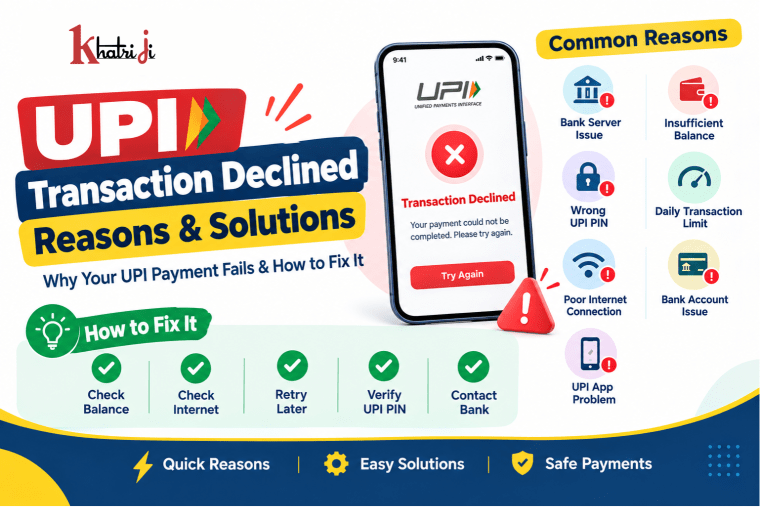
UPI has become one of the easiest and fastest ways to make digital payments in India. Whether you are paying a shopkeeper, transferring money to a friend, paying bills, or shopping online, UPI allows you to complete transactions within seconds.
However, sometimes a UPI transaction may be declined or fail unexpectedly. Seeing messages such as “UPI Transaction Declined,” “Payment Failed,” “Transaction Failed,” or “Bank Declined the Transaction” can be frustrating, especially when you need to make an urgent payment.
The good news is that most UPI transaction failures are temporary and can be resolved easily.
In this blog, we will explain the common reasons why UPI transactions are declined and the practical solutions you can try to complete your payment successfully.
What Does “UPI Transaction Declined” Mean?
A UPI transaction is marked as declined when the payment request cannot be successfully completed by the UPI system, your bank, or the recipient’s bank.
A UPI payment generally involves several systems working together:
Your UPI app → UPI network → Your bank → Recipient’s bank → Recipient
If there is a problem at any stage, the transaction may fail or be declined.
A declined transaction does not always mean that your bank account has a problem. It can also happen because of:
- Insufficient balance
- Incorrect UPI PIN
- Bank server issues
- UPI network problems
- Daily transaction limits
- Suspicious or unusual activity
- Incorrect recipient details
- Temporary technical issues
- Problems with the recipient’s bank account
Common Reasons for UPI Transaction Declined
1. Insufficient Bank Balance
One of the most common reasons for a declined UPI payment is insufficient funds in your bank account.
For example, if you are trying to pay ₹5,000 but your available balance is only ₹4,500, the transaction may be declined.
Solution:
Check your available bank balance before making the payment. Remember that your available balance may differ from the amount you expect if there are pending transactions, holds, or other deductions.
2. Incorrect UPI PIN
Your UPI PIN is required to authorize most UPI payments. If you enter the wrong PIN, the transaction will not be completed.
Entering an incorrect PIN multiple times may also temporarily block UPI transactions for security reasons.
Solution:
- Enter the correct UPI PIN carefully.
- Do not repeatedly guess your PIN.
- If you have forgotten it, use your UPI app’s Forgot UPI PIN or PIN reset option.
- Follow the bank’s verification process to create a new PIN.
Important: Never share your UPI PIN with anyone. Your bank, UPI app, or customer-support representative should never ask you to disclose your PIN.
3. Bank Server Is Temporarily Down
Sometimes the problem is not on your side. Your bank’s UPI servers may be experiencing technical difficulties, maintenance, or unusually high traffic.
When this happens, payments may fail even if you have sufficient balance and everything else is correct.
You may see messages such as:
- Bank server unavailable
- Bank declined the transaction
- Technical error
- Unable to process payment
- Transaction failed
Solution:
Wait for some time and try again. If the issue continues, check whether your bank has reported a service outage or contact the bank through its official customer-support channels.
4. UPI Network or Technical Issues
UPI transactions depend on communication between multiple banks, payment apps, and the UPI infrastructure. A temporary technical issue anywhere in this chain can cause a payment to fail.
Solution:
- Wait a few minutes.
- Close and reopen your UPI app.
- Check your internet connection.
- Try the payment again.
- If possible, try another UPI app linked to the same bank account.
Avoid making repeated payments immediately if the first transaction appears to be processing.
5. Daily UPI Transaction Limit Reached
Banks and UPI services may apply transaction limits based on factors such as transaction type, account, bank policies, and regulatory requirements.
If you have already made several transactions or transferred a large amount during the day, another payment may be declined.
Solution:
Check your bank or UPI app for the applicable transaction limit. If you have reached the limit, you may need to wait until the limit resets or use another permitted payment method.
6. Recipient’s Bank Account Has an Issue
Your account may be working perfectly, while the recipient’s bank account could be unavailable or experiencing technical problems.
For example, the recipient’s bank server may be temporarily down.
Solution:
Ask the recipient to check their bank account or try another UPI ID or bank account if they have one.
7. Incorrect UPI ID or Recipient Details
A payment can fail if the UPI ID is incorrect, inactive, or no longer linked to the intended account.
This is especially common when users manually type long UPI IDs.
Solution:
- Verify the recipient’s UPI ID before paying.
- Check the recipient’s name displayed by the UPI app.
- Prefer scanning a trusted QR code or selecting a saved contact when appropriate.
- Never send money simply because someone asks you to; verify the recipient first.
8. Internet Connectivity Problems
UPI payments require an active connection between your device, payment app, bank, and UPI infrastructure.
A weak or unstable internet connection can cause the transaction to fail.
Solution:
- Switch between Wi-Fi and mobile data.
- Move to an area with better network coverage.
- Restart your mobile data.
- Reopen the UPI app and try again.
9. UPI App Is Outdated
An outdated payment app may sometimes cause compatibility or technical problems.
Solution:
Update your UPI application through the official app store. Also make sure your phone’s operating system is reasonably up to date.
10. Bank Account Is Not Properly Linked
UPI payments depend on the bank account being correctly linked to your UPI profile.
If your mobile number has changed, your bank details have been updated, or there is a problem with the account mapping, transactions may fail.
Solution:
- Open your UPI app.
- Check the linked bank account.
- Confirm that the correct mobile number is registered with your bank.
- Re-add or refresh the bank account if the app provides that option.
If the issue continues, contact your bank.
11. Suspicious or Unusual Transaction Detected
Banks and payment systems use security measures to identify potentially suspicious transactions.
A payment may be declined if it appears unusual based on factors such as transaction patterns, amount, device, or other security signals.
Solution:
Do not repeatedly attempt the same transaction if you suspect a security block. Contact your bank through an official channel and ask whether your account or UPI service has been restricted.
12. UPI PIN Locked
If you enter an incorrect UPI PIN several times, your bank may temporarily prevent further UPI transactions.
Solution:
Wait for the applicable cooling-off period or reset your UPI PIN using the official process provided by your bank or UPI app.
13. Bank Account Has Been Frozen or Restricted
A bank account may have restrictions due to various banking or compliance-related reasons. If the account cannot process transactions normally, UPI payments may also fail.
Solution:
Contact your bank and ask whether there are any restrictions on your account. Resolve the issue with the bank before trying the UPI payment again.
14. UPI Payment Is Temporarily Unavailable for a Particular Service
Sometimes UPI may work normally for one merchant or person but fail for another.
This can happen because of a temporary issue involving the merchant, payment gateway, recipient bank, or a particular transaction route.
Solution:
Try again later or use another supported payment method if the payment is urgent.
What to Do When Your UPI Transaction Is Declined
If your UPI payment fails, don’t panic. Follow these steps.
Step 1: Check Your Bank Balance
First, confirm that you have enough money in your account to complete the payment.
Step 2: Check the Transaction Status
Open your UPI app and check whether the payment is:
- Failed
- Declined
- Pending
- Successful
This is important because a payment that appears unsuccessful on the merchant’s screen may still be processing.
Step 3: Don’t Immediately Pay Again
If money has already been debited, avoid making another payment immediately.
First, check the transaction history and your bank account.
Step 4: Check Your Internet Connection
Switch between mobile data and Wi-Fi and try again if the transaction has genuinely failed.
Step 5: Try Again After Some Time
If the bank or UPI network is experiencing temporary technical problems, waiting a few minutes may solve the issue.
Step 6: Try Another UPI App
If you have another trusted UPI app connected to the same bank account, you can try using it. However, don’t repeatedly initiate the same payment if an earlier transaction is still pending.
Step 7: Contact Your Bank or UPI App Support
If the problem continues, use the official support option in your UPI app or contact your bank.
Keep the following information ready:
- Transaction ID/UPI reference number
- Date and time of transaction
- Amount
- Recipient details
- Screenshot of the error, if available
What If Money Is Debited but the UPI Transaction Fails?
This is one of the most concerning situations for users.
You may see a failed transaction in the app while the amount has already been deducted from your bank account.
In many cases, the transaction status is updated later and the amount is automatically returned if the payment did not reach the recipient.
What should you do?
- Check your bank statement or account balance.
- Check the transaction status in your UPI app.
- Note the UPI transaction/reference number.
- Do not immediately send the payment again.
- If the amount is not reversed within the applicable resolution period, raise a complaint through your UPI app or bank.
The exact resolution time can depend on the transaction type and the circumstances of the failed payment.
UPI Transaction Pending vs Declined
It is important to understand the difference between a pending and a declined payment.
| Status | Meaning | What You Should Do |
|---|---|---|
| Successful | Payment has been completed | No action required |
| Pending | Payment is still being processed | Wait and check status |
| Declined/Failed | Payment could not be completed | Check the reason and retry if appropriate |
| Debited but failed | Money left your account but payment wasn’t completed | Check status and wait for reversal/raise a complaint if necessary |
Never assume that a pending transaction has failed simply because the recipient has not received the money yet.
How to Prevent UPI Transaction Failures
You can reduce the chances of UPI payments failing by following a few simple practices.
Keep Your UPI App Updated
Always use the latest version of your trusted UPI application.
Maintain Sufficient Balance
Check your available balance before making important payments.
Remember Your UPI PIN
Use your correct PIN and avoid repeated incorrect attempts.
Verify Recipient Details
Before pressing the payment button, check the recipient’s name and UPI ID.
Maintain a Stable Internet Connection
Avoid making important payments when your network connection is unstable.
Don’t Share Your UPI PIN
Your UPI PIN is confidential. Never share it with anyone.
Keep Your Mobile Number Updated With Your Bank
Your registered mobile number is important for many banking and UPI functions.
Avoid Repeated Payments
If a transaction is pending, wait for the status to update before trying again.
Is a Declined UPI Transaction Dangerous?
A declined UPI transaction is not necessarily a sign of fraud or a serious problem.
Most failed transactions happen because of temporary technical issues, insufficient balance, incorrect credentials, transaction limits, or bank-side problems.
However, you should pay attention if:
- You receive unexpected payment requests.
- Someone asks for your UPI PIN.
- Someone asks you to enter your PIN to receive money.
- You receive a collect request from an unknown person.
- You notice an unauthorized debit.
- Someone asks you to install a remote-access application to “fix” your payment.
If you suspect fraud, contact your bank immediately and use the appropriate official fraud-reporting channels.
Can You Receive Money Without Entering a UPI PIN?
Generally, you do not need to enter your UPI PIN simply to receive money into your bank account.
The UPI PIN is normally used to authorize payments or other transactions that require authentication.
Therefore, if someone tells you, “Enter your UPI PIN to receive money,” be extremely cautious.
Similarly, never enter your UPI PIN after scanning a QR code unless you are intentionally making a payment and have verified the recipient.
When Should You Contact Your Bank?
You should contact your bank if:
- UPI transactions continue to fail for an extended period.
- Your account is being declined despite having sufficient funds.
- Your UPI PIN is blocked and cannot be reset.
- Money has been debited but is not returned within the applicable timeframe.
- You notice an unauthorized transaction.
- Your bank account appears to have a restriction.
- You cannot link or verify your bank account with UPI.
Always use the bank’s official website, mobile app, branch, or verified customer-service number rather than contact details received from unknown messages or callers.
Frequently Asked Questions About UPI Transaction Declined
Why is my UPI transaction declined even though I have enough balance?
A sufficient balance does not guarantee a successful UPI payment. The transaction may still be declined because of bank-server problems, UPI network issues, transaction limits, security checks, incorrect PIN, recipient-bank problems, or other technical issues.
Why does UPI say “bank declined the transaction”?
This generally means the bank did not authorize or process the payment successfully. Possible causes include insufficient funds, transaction limits, security restrictions, technical problems, or temporary bank-server issues.
Will I get my money back if my UPI transaction fails?
If your account was debited but the transaction was not successfully completed, the amount may be automatically reversed according to the applicable payment-system and bank processes. Check your transaction status and bank statement, and raise a complaint if the amount is not resolved within the applicable timeframe.
Can I retry a declined UPI transaction?
Yes, if the transaction is clearly marked as failed or declined and no amount has been debited. Before retrying, check your balance, recipient details, and transaction status.
What should I do if UPI is not working today?
First, check your internet connection and transaction status. If everything appears normal, the issue may be temporary. Wait and try again later. If multiple transactions continue to fail, contact your bank or UPI app’s official support.
Why is my UPI payment failing only with one person?
The problem may be related to the recipient’s UPI ID, bank account, bank server, or payment setup. Verify the recipient details and try again later.
Does entering the wrong UPI PIN cause the transaction to decline?
Yes. An incorrect UPI PIN can cause a payment to fail. Multiple incorrect attempts may also result in a temporary security block.
Can I use another UPI app if one app is not working?
If the same bank account is properly linked to another supported UPI app, you may be able to use it. However, first check whether your original transaction is pending to avoid accidentally paying twice.
Final Thoughts
A UPI transaction declined message can be frustrating, but it does not always indicate a serious problem. In most cases, the cause is something simple such as insufficient balance, an incorrect UPI PIN, poor internet connectivity, a temporary bank-server issue, a transaction limit, or a problem with the recipient’s account.
The most important thing is to check the transaction status before trying again, especially if money has already been deducted.
If the issue continues, keep your transaction reference number and contact your bank or UPI app through its official support channels.
By understanding the common reasons behind UPI failures and following the right troubleshooting steps, you can resolve most UPI payment problems quickly and make digital payments more safely.
If your UPI transaction is declined or shows as failed, do not immediately retry the payment. First, check the transaction status and verify whether the amount was debited from your bank account. You can read our Khatriji Transaction History guide to learn how to check successful, pending, and failed transactions. If you are making a payment using a QR code, also read our UPI QR Code Scam guide to learn how to verify a QR code before making a payment and avoid common UPI payment scams.
Tags: banking, digital payments, Online Payments, UPI, UPI Payment, UPI Payment Failed, UPI Refund, UPI Transaction, UPI Transaction Declined, UPI Troubleshooting